
Unlocking your phone opens up a world of possibilities 🌍. You'll be able to update faster ⚡, install apps from alternative sources beyond the Play Store, and use SIM cards from any carrier you choose — including international ones for travel! 💰 Whether you want to switch to a better plan, save on roaming fees, or simply have more control over your device, removing the network lock is the answer. Read on for all the details!
What is Network Unlock and how to Unlock your Phone in 2026
#1 Network Lock Removal Service Online
Works on All Phone Brands
Supports 200+ Carriers Worldwide
Instant Remote Unlocking
100% Permanent & Safe

Is your phone locked to a specific carrier and rejecting other SIM cards? Our professional network lock removal service eliminates these restrictions instantly, giving you the freedom to use any carrier worldwide. No complicated procedures, no long waiting times—just a fast, permanent solution that works on iPhones, Samsung, Google Pixel, Xiaomi, LG, and all major brands!
✅ Trusted by Thousands of Users | 🔧 Professional Methodology | 🛡️ Safe & Legal | 📆 Updated
Carrier Lock and SIM Restrictions: What is Network Unlock?
🔐 When you buy a phone from a carrier or the second-hand market 🛒, you may notice it won't accept a different SIM card from another carrier. This restriction is called a network lock 🚫. To use your phone with any carrier, you need what's called a network unlock 🔓 — this allows you to use any SIM card regardless of the carrier it belongs to 🌍.
What Does the SIM Network Lock Specifically Do?
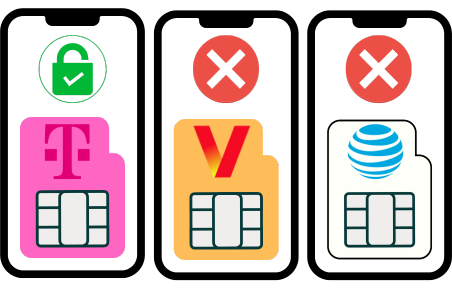
🔒 A carrier lock restricts your phone to a particular network, making it unable to connect to any other provider 🚫. This happens because the cellular band or network terminal is programmed to only read that specific carrier's network frequency 📶. For example, if your phone is SIM locked to T-Mobile and you insert an AT&T SIM card, the device won't read the SIM — it will act as if there's no signal at all ❌.
Key Point: The lock is software-based 💻 and tied to your phone's IMEI 🔢, not the physical SIM slot itself 📱.
How Do I Know if My Phone is Network-Locked?
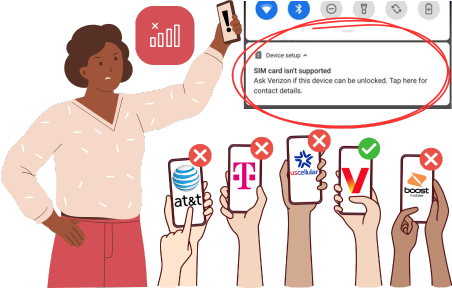
📲 You'll know your phone needs a SIM unlock when you insert a new SIM card and the device shows a notification or pop-up saying the SIM card is not valid ⚠️ — it will ask you for a code to unlock the phone 🔑. This happens every time you try to use a different carrier, no matter if you have a Samsung, an iPhone, or any other phone 📱. The message will be the same, and you won't be able to use the new SIM until unlocked.
Quick Test: Simply insert a SIM from a different carrier 🔄 — if it doesn't work or asks for a code 🔐, your phone is network locked 🔒.
Drawbacks of the SIM Lock and Why You Should Unlock Your Phone
🔒 A locked phone has some important differences from normal devices 📱. This might not be a problem if you're a casual user who just checks social media 📲, makes calls 📞, or takes pictures 📷. However, if you're a more experienced user who wants freedom and flexibility with your phone, this could be a real problem ⚠️. Here are the main drawbacks of locked devices 👇
Restricted Networks
📶 You won't be able to use services from other carriers apart from the operator that owns your phone 🔐. This forces you to use only their services and pay whatever cost they ask 💸 — no shopping around for better deals!
Less Value

💰 Locked phones are generally worth less than unlocked ones when reselling 🏷️. Buyers think twice before purchasing a phone that only works on a single carrier — it's simply less useful and limits their options 🤔.
Can't Be Used Abroad

🌍 If your phone is locked to one provider, it will only work under that carrier's coverage area 📍. Visit another country 🛫 and you'll pay expensive international roaming 💸 — unlocked devices work with any local operators 🆓!
🔍 How Can I Tell if My Mobile Device is Locked to Its Carrier?
Try Another SIM
Insert a SIM from a different carrier — if it doesn't work, you're likely locked
Check Settings
Go to Settings → General → About (iPhone) or Connections (Android)
Call Your Carrier
Contact customer service and ask them to verify your lock status
📱 The exact steps vary depending on your device make and model 🔧 — iPhones and Samsung devices have different menu paths, but all phones have this information somewhere in settings ⚙️. When in doubt, checking your settings is the most reliable method to confirm if your phone is network locked ✅.
Official Device Unlock Methods to Fix a Phone Tied to One Network
🔓 There are several ways to unlock the network lock on your device 📱. Here are the two most common official methods to get your phone unlocked and ready to use with any carrier worldwide 🌍:
Carrier Unlock: Contacting the Original Service Provider
✅ This type of unlocking is usually permanent, and once you have unlocked your phone, you will be able to use it with any carrier you want 🌍. To unlock your phone, you will need to contact your carrier and request an unlock code 🔑. Once you have the code, simply enter it into your phone, and your phone will be unlocked 🎉!

Factory Unlock: Unlock Your iPhone or Android with the Manufacturer
⏳ This type of unlocking is usually temporary and needs to be renewed after a certain time 🔄. To factory unlock your phone, you will need to contact the manufacturer of your phone and request an unlock code 🔧. Once you have the code, simply enter it into your phone, and your phone will be unlocked 📱!

Requirements to Unlock Your Device Directly with the Carrier
📞 Contacting your carrier to generate a network unlock code is the official way to remove this lock 🔓 — they're the ones who activated it in the first place! However, this isn't easy because you need to meet certain phone unlocking conditions ⚠️. The carrier will only unlock your phone if the device is eligible to be unlocked.
🤔 The issue is that it's not convenient for network providers to unlock devices — they'd rather keep you using their services 💰. So the requirements they set are often very difficult to meet for most users 😓. Here's what they typically require 👇:
⚠️ Requirements the Original Network Provider May Ask You to Meet
You must contact the original carrier of your phone specifically
You must be the original owner of the phone
You must be in good standing with the carrier to unlock the device
Your phone needs to have been active on that network for at least a year
The phone must be fully paid for if it was financed with the carrier
The device cannot be reported as lost, stolen, or blacklisted
🤔 How to Unlock a Mobile Phone if It's Not Eligible to Be Unlocked with the Carrier?
💡 If you want to unlock your phone to use it on another network, but you don't meet your carrier's requirements 😓, then we recommend using a third-party unlock service like SafeUnlocks 🔓. We offer an easy, fast, and effective unlock process for you to fix your phone and switch from one network provider to another without a problem ✅!
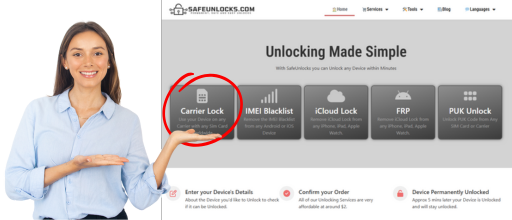
SafeUnlocks SIM Unlocking Service | #1 Third-Party Unlock App
🚀 The unlocking process with us is really easy to carry out! You don't need any special or hard-to-get information 📋 — with just some basic details, you can unlock your device in minutes ⚡:
📝 Once you have those details, simply submit them on the form on our official page 🌐. Below the form, mark the box to accept the only price we ask: $1 for a permanent unlock (no hidden fees or trial periods!) 💵
How does the Process Work?
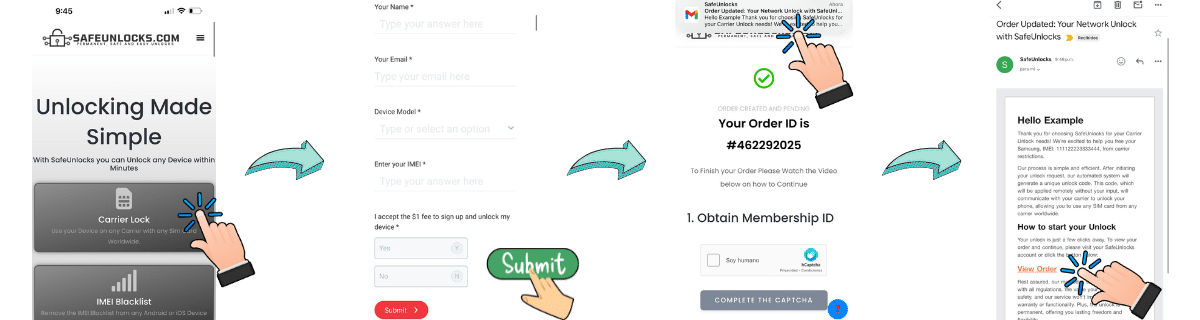
✅ After filling out the form, you'll receive a confirmation email and be asked to activate your order and create an account for security 🔒. Then you'll access our payment gateway to process the $1 payment 💳. That's it — we'll handle everything from there and notify you as soon as the unlock is done 🎉!
Requirements
🆓 The only requirement is to get a free membership with us! You can do it in minutes with just an email address 📧. After acquiring your membership, simply update your details on our webpage and continue with the unlocking process ⚡.
Why Choose SafeUnlocks?
🎉 Removing the lock from any phone has never been so easy, fast, and reliable! Try us today and discover all the advantages of an unlocked phone 🔓. Questions? Contact us — our customer service is available 24/7 📞.
How to compare carrier / SIM lock
A carrier or SIM lock is stored against the phone IMEI. Until the original operator releases that record, another network SIM will not register. carrier / SIM lock is the case this page is about in 2026. That is a commercial network control, not proof the handset was stolen.
Write down the official unlock or recovery rules from the original operator or maker before you open a third-party form. Eligibility, fees, and turnaround belong in that note. If a listing contradicts the published policy, treat the listing as the weaker source.
If you cannot show the IMEI and the lock screen, you cannot compare listings honestly. carrier / SIM lock depends on those two facts. /random-imei-generator-online explains IMEI structure; it is not a blacklist cleaner or a network release.
SafeUnlocks publishes comparison copy for “What is Network Unlock and how to Unlock your Phone in 2026.” We do not take payment to unlock a device, and we do not run a hidden shop behind this URL. If a form appears on the page, treat it as a path into a listed partner flow, then read the partner’s terms before you send an IMEI.
Skim the headings, then the related carrier unlock guides. If a child page names a different country or brand than carrier / SIM lock, it is a sibling, not a translation of this URL. That is how the comparison set is organized.
A shop that sells one price for every lock type is not comparing the same job. carrier / SIM lock sits in the carrier bucket. Cross-check the lock screen against that bucket before you treat a quote as relevant.
Ask every listing for carrier / SIM lock whether a finance hold or theft report blocks the job. A shop that will not answer that in writing is not a complete option on this comparison page.
Timelines for carrier / SIM lock are not one number. Official carrier or brand desks may take hours or several days. Blacklist and Activation Lock cases can sit longer because a third party owns the record. Any 2026 “five minute” claim should name which lock type it is talking about.
If the line still owes money, official desks will often refuse carrier / SIM lock. Third-party listings that ignore that sentence are selling a different job than the one on the lock screen.
Bookmark the official policy and your IMEI note, then use the carrier unlock guides to move sideways. carrier / SIM lock is one node in that map, not a promise that every device in the family will qualify.