


Skip to content

Carrier Unlock UAE

Want to remove the carrier lock on your UAE Phone? Thankfully for you, SafeUnlocks has developed a tool that allows you to unlock your device without any restrictions. This tool has been tailored for UAE users, allowing you to unlock any phone that has been restricted by a phone carrier in the UAE. Do not wait any further, try out web app tool today and enjoy the freedom of an unlocked device.

Unlock your smartphone’s full potential and say goodbye to SIM network restrictions with SafeUnlocks’ carrier unlock UAE service. Let’s review together how you can easily remove this lock and better understand how it can affect you. By the end of this guide, you will know everything there’s to know about a carrier lock, so let’s not waste more time and begin with this amazing guide right away.

What Options Are There to Unlock a UAE Mobile Phone from its Carrier?

What Options Are There to Unlock a UAE Mobile Phone from its Carrier

When someone is facing a network provider lock in the UAE, there are usually two ways of fixing it and being able to switch carriers. The first alternative is to call them directly (by going to a service center or visiting their online page) and request an official unlock code. The second method, which is more common and has gained lots of traction in the last year, is using a remote unlocking service to clean up the phone’s restrictions quickly.

Each has different requirements but the result is still the same, so by doing either, you can use your phone with any SIM card you choose. The only thing both methods will have in common is that the 15-digit IMEI code is necessary as it has all the data required to fully clean the network restrictions, so make sure to have it handy.

What Carriers Can Be Unlocked in UAE?

All of them can be unlocked in the UAE; Etisalat and Du have the option for SIM unlock, and even other virtual mobile carriers can offer assistance to remove the lock and network restriction. Another thing to take into consideration is that new devices are being sold without the lock. So if you want to purchase a new one from an authorized store or retailer in the UAE, it should be ready to use with any network of your choice.

How do I determine if my UAE SIM Card can be Unlocked?

After some time, the UAE phone should be automatically unlocked because when this lock is active, it is because the phone is under contract with a specific carrier, so it’s not permanent. If it doesn’t do that after the established time, then you can try looking for your carrier’s website like Etisalat or Du and see if they have a tool available to check the status of your phone. You can also use third-party sites to learn the status of the locked device. 

Carrier Unlock UAE: Why do I require an NCK Code to Unlock my Phone?

Carrier Unlock UAE Why Do I Require an NCK Code to Unlock My Phone

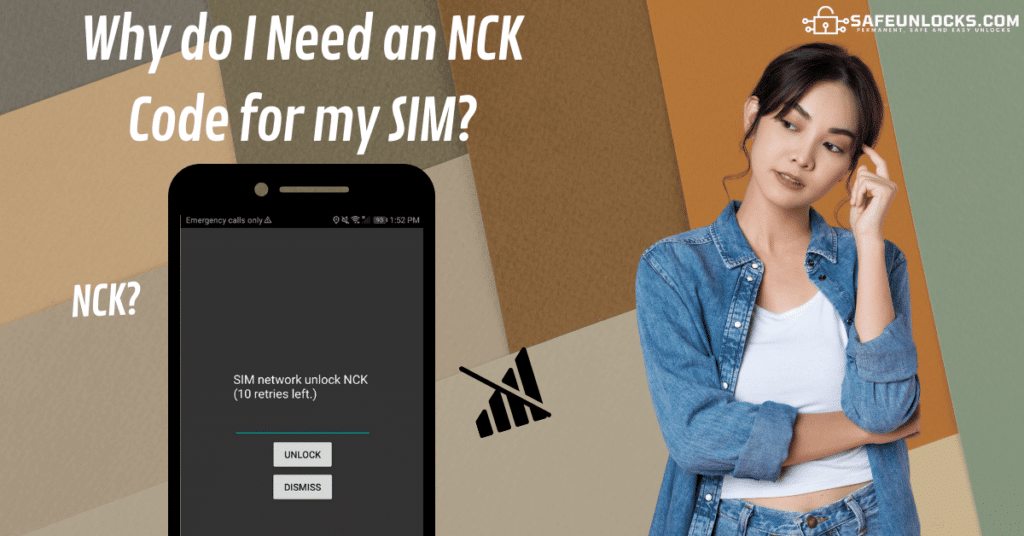
An NCK, or Network Control Key, is a passcode that allows the user to deactivate the network lock restrictions. This code can be retrieved from the carrier itself or an unlocking service (like SafeUnlocks) and used to disable the phone’s firmware with the restriction enabled. Don’t worry, this is a safe procedure, and the only thing that it does is unlock the network for any zone in the UAE for you instead of being locked to one indefinitely. 

Why is my new SIM Card being Rejected by my UAE Phone?

Why is my new SIM Card being Rejected by my Phone

If the SIM card is rejected by the UAE phone and is not from the original carrier, it can be a carrier lock problem. If the same SIM is not being recognized, it could be a physical issue with the phone or SIM, for example. It can also be the network settings got disfigured, and you need to set them manually. Last but not least (although this is not very common) is that the phone got blacklisted in UAE somehow, and you cannot use your device.

There can be many reasons why a SIM Card is not being recognized. In this case, we recommend testing it as much as possible or contacting your carrier for more information. If it really is the carrier lock, you know you can do it either with the network carrier or with the best tool in the market right now, SafeUnlocks, with a success rate of 99.9%. 

If the Unlock Request is Rejected, how can I Unlock my iPhone or Samsung?

If the Unlock is Rejected how can I Unlock my iPhone or Samsung

If the unlock process with your UAE carrier got you nowhere and the phone is still in contract with a network provider you don’t want to use; then we invite you to use the safest method to unlock your phone and SIM online, called SafeUnlocks. Unlock your iPhone models or Android devices of any brand anywhere in the UAE or the world without factory unlocking the device, jailbreaking it, or using complicated software.

The unlocks take less than an hour, and we will provide you with a specific NKC code so the phone is secure and can be cleaned as quickly as possible. Let our servers do all the heavy lifting as our system will automatically process your device, and all you have to do at that time is follow a simple set of instructions so the changes are safe and the phone is permanently unlocked. 

Do I need to be the Phone’s Original Owner to Carrier Unlock it?

If you wish to unlock this device with your current UAE network provider, yes, it is necessary to be the original owner, as you need to have a contract or account number with them in order to use their services. For SafeUnlocks, it is not necessary, and you can unlock any device remotely as long as you have the IMEI number, so you can do it as a favor for someone else from the comfort of your own home.

Do I need the latest iOS or Android Version to Remove a Carrier Lock?

Do I need the latest iOS or Android Version to Remove a Carrier Lock

Not really, as the OS version won’t affect the creation of the code or the cleaning process. Remember that we can manage any device and brand in the UAE, including any OS version they may have at the moment, so even if it is an old one, we can still help you clean the device. Still, if you want, you should be able to update the device to the latest version without issues before doing the procedure or using our software unlock service.

How do you Unlock your UAE Phone Permanently with this Unlocking Service?

How do you Unlock your UAE Phone Permanently with this Unlocking Service

In order to use this UAE online unlocking service, go to SafeUnlocks.com, and under services, select ā€œCarrier Unlock.ā€ There, you will be redirected to another page where you must fill out a form with your full name, email address, device brand (Samsung Galaxy, iPhone X, Huawei, etc.), and IMEI number. After you finish, confirm your identity and validate your request with the $1 payment so the server can start working on your mobile equipment. 

How do you Unlock your Phone Permanently with this Unlocking Service 1

Remove the UAE SIM card you are currently using and follow the onscreen instructions so the server can provide you with the unique NCK code. When you have the code, put it on the phone and wait a couple of minutes for the unlock to complete. Wait for the confirmation message that the unlock is done, restart your phone for some minutes, insert the new SIM card, and it should be ready to go.

Is this UAE Phone Unlocking Tool Safe to use and Available outside the Country?

Yes, we count on specialized servers that protect and encrypt your data from cyberattacks so no one can access it. Since we are an online tool, we can be used worldwide 24/7 or in any other zone in the UAE without interruptions. So, if you are planning on traveling soon and need a reliable service so you can choose the network you want later, SafeUnlocks is the quickest and most efficient solution for that. 


Carrier Network Unlock Service

Identifier Type *

You can find your IMEI by dialing *#06# on your device or in Settings → General → About.

How to compare carrier / SIM lock in the UAE

Network locks exist so a subsidized or contract phone stays on one operator until the account rules are met. For carrier / SIM lock in the UAE, the lock follows the device, not the plastic SIM you swap. Official unlock policies and independent comparison shops both start from that IMEI record.

the original operator or maker in the UAE still controls the source record for this lock type. A comparison page cannot replace that desk. Use it to see which shops disclose the same limits the official policy already states in 2026.

Before you compare shops for carrier / SIM lock in the UAE, collect the 15-digit IMEI (dial *#06#), a photo of the exact lock screen, and proof you are allowed to request a change. The IMEI format helper at /random-imei-generator-online is only for checking digit layout. It does not create a live identity for a real phone.

This URL is a 2026 comparison article, not a checkout for SafeUnlocks labor. Partner forms, if present, belong to the services being compared. Keep receipts and policy pages from those parties, not from a brand claim that ā€œwe unlockā€ this handset.

Treat the body below as source material from the original guide, and treat this briefing as the portal layer. Together they should tell you whether carrier / SIM lock in the UAE is a SIM issue, an account lock, or a database flag before you leave the carrier unlock guides.

Country context matters for carrier / SIM lock in the UAE. Local databases, consumer unlock laws, and prepaid versus postpaid rules are not copied from another market. A 2026 listing that ignores that geography is a weak comparison.

Mixing lock types is how people buy a carrier unlock for an iCloud screen. carrier / SIM lock in the UAE is labeled carrier so the related links stay in family. Leave the page if the device is showing a different lock.

Red flags when you compare carrier / SIM lock in the UAE listings in 2026: guaranteed success with no IMEI check, ā€œone tapā€ claims, and copy that never names the lock type. Prefer shops that state refund rules, processing windows, and what happens if the official desk refuses the request.

Plan carrier / SIM lock in the UAE as a request with a queue, not a download. If the lock is carrier, the clock starts when the party that owns the record accepts the case, not when you paste an IMEI into a form.

Ownership and payoff sit above lock type. Confirm both before you compare prices for carrier / SIM lock in the UAE. A cheap quote on a financed or reported device is not a bargain; it is a mismatched offer.

You now have a 2026 briefing for carrier / SIM lock in the UAE: lock family, official desk, checks, and the red flags that show up in ads. Continue into the original guide below and the related carrier unlock guides when you want a sibling country or brand. Stay on the lock type you actually have.