
If you’re looking for information on how to unlock EE network-locked devices, this guide is perfect for you as we’ll explain here all there is to know to safely and easily get rid of this lock. It doesn’t matter if you own an iPhone, an Android, or any other type of device, we’ll teach you different ways of fixing this problem and will present you with the ultimate SIM-lock removal solution!
How to tell if your Device is Locked to the EE Network
There are certain phone brands that you know for sure come fully unlocked like Google Pixel, Oppo, and OnePlus, but how can you confirm whether a phone from another brand is SIM-locked or not? Well, the best option for this is to either use an online SIM-lock checker or to test the device yourself using a SIM card from a different carrier. In the second case, what you need to do is get a non-EE chip and insert it into the phone to see if it works or not; if it doesn’t and prompts you to enter an unlock code, the phone is locked!
How to Run an IMEI Check to Confirm if a Device is Locked to EE
This is another option that’s also very fast and can help you confirm your device’s SIM-lock status in a couple of seconds without having to pay anything. For that, the very first thing you need to do is find the IMEI checker of your preference, but don’t worry because there are tons of options on the internet, and once you know which one you want to use:
- Enter the IMEI number of the phone in question.
- Submit your request.
- Check on the results whether it says “unlocked” or “SIM locked”.
How do I know if my iPhone is Locked to EE?
This is actually very easy because, in the case of Apple devices, EE has implemented a quick and easy status-checking alternative via SMS messages. All you have to do is text the word “UNLOCK” (all in capital letters) to the number 150, and you’ll receive a text confirmation saying whether the device is locked or not.
How to check directly with EE whether your Phone is Locked or not
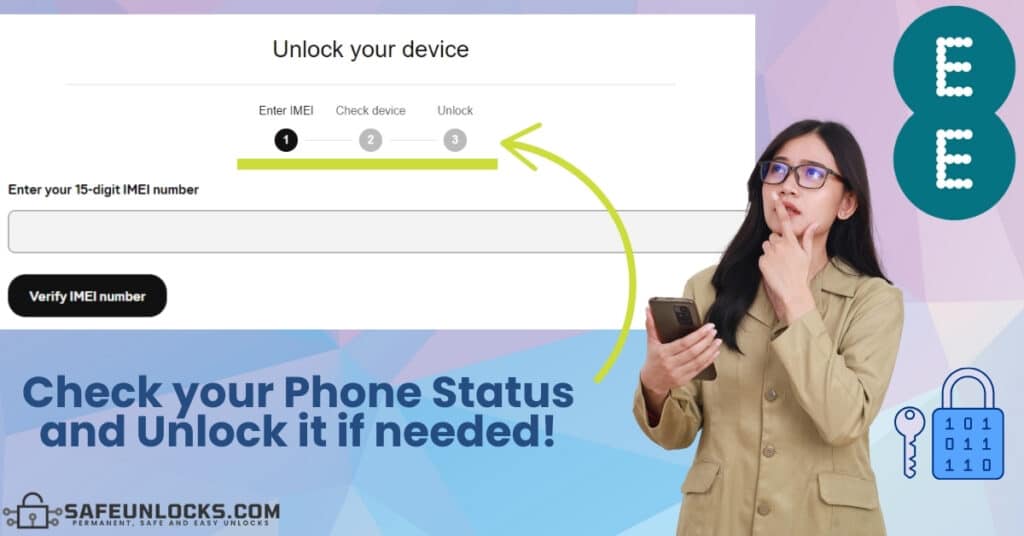
If you don’t want to try the solutions we mentioned before, or simply want to be 100% sure and reconfirm, you can also run an IMEI check directly with the network provider. EE has available a module in which you only have to enter your IMEI code and see if you can use it with another network or not, just click here to run the verification directly with them!
How do I unlock my Device directly with EE?
Well, if you did check your phone’s status using EE’s online platform, you’ll notice that it says “Device Unlock”, and well, that’s because they also use that module to process unlock requests. After you have entered your phone’s IMEI on the EE website, you’ll be told whether it’s locked or not, and if it is, it’ll prompt you to continue the lock-removal process. However, remember that this is only if you’re eligible and meet the carrier’s unlocking policies (the mobile phone cannot be blacklisted, you must be its original owner, etc.).
Is there any charge for Unlocking a Device directly with EE?
Not at all, there’s no charge to unlock a device directly with its original carrier because they were the ones to lock it in the first place, so don’t worry about it because the procedure doesn’t have a cost. However, we do recommend verifying the specifications on your contract because in some cases, even though the procedure itself is free of charge, you can end up paying an early termination fee.
What other options are there to Unlock my Device from EE?
There are tons of alternatives for those who don’t want or cannot get rid of the EE-network lock directly with the network provider. It’s all about looking for an option that fits your needs, is compatible with your specific phone brand and model, and of course, is safe to use. Let’s see together the principal methods there are, and let us introduce you to SafeUnlocks: The #1 SIM lock removal solution on the internet nowadays!
What External Unlock Options are there for EE Phones?
- Bypass Apps: These apps are known as APK or IPA files and are a temporary solution that doesn’t actually unlock your device but only bypasses the lock. These are not recommendable because they must be downloaded from untrusted sources and normally come with spyware, trojans, and in general, malware viruses.
- Jailbreak or Root: Jailbreaking/rooting a mobile phone is a way of getting admin access to your smartphone for you to deactivate the SIM lock, but it’s not recommendable either. First of all, this is very invasive and phones are not designed to support these types of software modifications, but that’s not all because you can also permanently damage the phone!
- Technical experts: Hiring a technician to get mobile help from an expert is also an option, but a very expensive one because they charge from $50 up to more or less $200 depending on the type of phone you have. It only requires you to go to the tech support store, but also to leave the phone there for a couple of days while they fix it, so it’s not really practical taking into account you can do this 100& online and in minutes.
What is SafeUnlocks and how can It help me?

SafeUnlocks.com is an online unlocking tool designed specifically for all those customers who want to get rid of the EE network lock on their phones, but can’t do it through official means. This service is completely remote, all is done from our official website, only costs $1, and best of all, is non-invasive and completely safe to use on any Android or iOS device.
Unlock EE only using your phone’s IMEI Number!
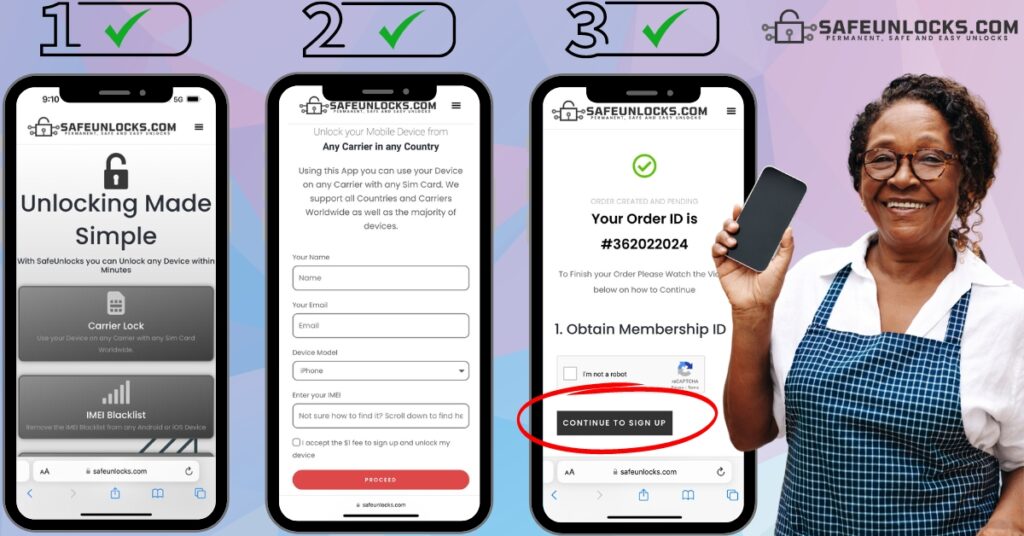
All you need to unlock your mobile device to use other network’s SIM cards is to provide us with certain info, like for example, your name and email address, along with the phone’s brand and IMEI number. With that and 5 minutes of your time, you’ll be able to start the unlocking process with us and enjoy a fully unlocked phone! Just follow these instructions to get and use the unlock code of your device in less than an hour:
- Visit SafeUnlocks.com.
- Go to the carrier unlock section.
- Enter the necessary information.
- Submit and activate the order.
- Make the $1 payment.
- Wait until we complete the process.
What do I do after receiving the Unlock Code of my EE Phone?
This is the easiest part of unlocking your phone, you simply need to remove your EE SIM from the device and insert another chip from a different network, triggering the phone’s lock. You’ll see that the phone doesn’t recognize the new SIM, which prompts you to enter a code to unlock its cellular bands and open its terminals to the new carrier. So, simply enter the code provided by SafeUnlocks and wait a couple of seconds while the device is unlocked and that’s it, from now on, you’ll be able to use any carrier including Vodafone, O2, and Three, among others.