

Skip to content

Leading IMEI Unlock Service | Canada

Fast & Reliable Blacklist Unlock Service

Restore your device with SafeUnlocks’ online service that removes your IMEI from the blacklist. This solution is designed to work with all models, versions, and regions, ensuring smooth and hassle-free functionality. SafeUnlocks offers a reliable and efficient way to bring your device back to its original state. With our easy-to-use service, you can enjoy uninterrupted access to all features. No matter where you are, we guarantee seamless performance for your device. Trust SafeUnlocks to get your device back to working like new.

In SafeUnlocks, we have the best way and tool to unlock IMEI numbers without doing so many things. Learn in this informative guide how to clean this restriction and what the benefits of having a clean IMEI are so you can start your process and enjoy them today without limitations!

What happens if a Phone is Reported as Stolen?

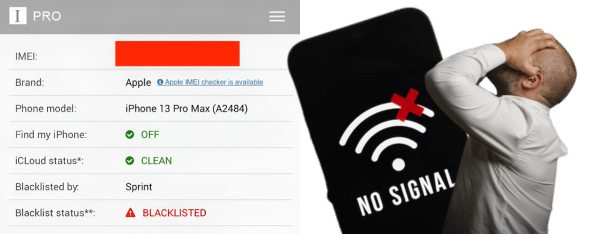
When a phone is reported on the blacklist and is added to the database, what it does is lock all the cellular network connections so it can’t be used with any type of mobile network—blacklisted phones can only work with Wi-Fi. Besides that, the device’s basic functions, such as calls, messages, and carrier updates, will be disabled, so it cannot be used as a regular phone anymore. 

What happens if a Phone is Reported as Stolen 1

Can the IMEI Change with the SIM Card?

No, the phone’s IMEI can’t be changed with the SIM card, as they are two different things. If you change the SIM with a blacklisted phone, then it won’t be recognized. However, if you use it on a phone that is not listed, then it will work normally regardless of the IMEI it has or the type of network connection you use. 

Is my Phone Blacklisted or Carrier Locked?

Is my Phone Blacklisted or Carrier Locked?

To know if your phone is blacklisted or needs a SIM unlock process, you can use specialized online services that can tell you the status of your IMEI. You can check sites like IMEIPro.info or IMEI24.com, and it will tell you if your phone’s IMEI number is locked or if you have a carrier lock that needs to be solved directly with them, as they will provide the steps to do it or the unlock code. 

Who Unlocks a Duplicated IMEI Number?

No one can unlock a phone if it has a duplicated IMEI, not even your network provider. If an IMEI is duplicated, you must report it immediately to your carrier and inform the manufacturer about this issue. What you can do is call their customer support or go to the store where you acquired the device so they can change it under warranty. If it is already blacklisted for fraud or it was reported lost or stolen, do not attempt to unlock it, as it can get you in trouble. 

Every Phone has a Unique Number

Can a Different Carrier Lock a Phone?

Every Phone has a Unique Number 
Can a Different Carrier Lock a Phone by IMEI?

The International Mobile Equipment Identity is a 15-digit code designed to identify mobile devices. It is so used nowadays because manufacturers and carriers need to keep a registry of every device to know which ones connect to certain networks (GSM or CDMA). It is also used to keep info about the device, like the model, country, serial number, and type of connection. 

Only the original carrier or the original owner can lock a phone or create a blacklist report. Same way around if you want to clean the IMEI from the reporting database. So, if you have Rogers, for example, only they can register the device and sometimes can help unlock it; other network carriers like AT&T, T-Mobile, or Bell can interfere with this process or lock the device

Benefits of Unlocking Your Phone

When you clean the blacklist report with SafeUnlocks, you will be able to enjoy a lot of benefits. For starters, you should be able to connect to your mobile network, switch carriers inside Canada (you can start this process immediately with us as well), and update your device to the latest network connections without being blocked. 

Other benefits can include selling your device for a better price since it is no longer blacklisted. You can use it abroad as long as it is compatible with other signals and technologies (4G or 5G, for example). Unlock your device with us and keep it secure without interfering with the settings or changing important data; all you need to do is follow some simple steps, and we will do the rest. 

The Benefits of Unlocking Your Phone

Process your Unlock Online!

If you want to unlock your iPhone or Android device without external programs or having to use a computer every time, you can go to SafeUnlocks and do it from there in less than one hour. You just need to follow the instructions, and in a couple of minutes, the mobile phone will start working again, and you will be able to make calls, send messages, and connect to your mobile plan!

What Details Must You Provide to Unlock Phones?
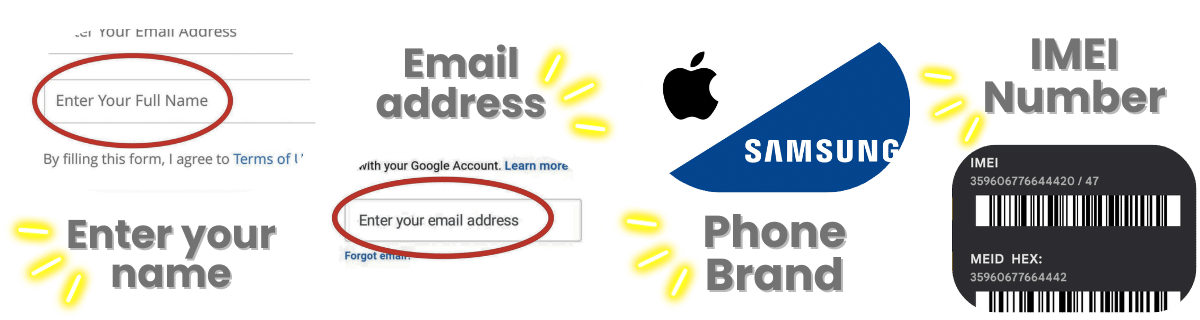
What Details Must You Provide to Unlock Phones

In order to use our service, you only need to enter a few pieces of information, such as your name, email address, manufacturer (Samsung, iPhone, Xiaomi, Huawei), and the IMEI code that you can find by dialing *#06#. After that, you need to check your email, as we will send some steps there, and we will send you the membership key to start your unlock process.

Once you enter the access key on the site, the servers will start working and will clean your smartphone using the IMEI number. When that part is done, you will get a message so you can restart the device and test the connection. You can do it by making a call or checking if your mobile plan is still active and working.

Explore Our FAQ and Find all the Anwers you Need!

Here, we will answer some questions about this lock and the service, as we know that it is an extensive topic with many things to explain. If you need more info about it or want to know more about the blacklist and the different types of reports, you can visit our blog and check all the content we have available for you. 

IMEI Blacklist Unlock Service

Identifier Type *

You can find your IMEI by dialing *#06# on your device or in Settings → General → About.

How to compare IMEI blacklist / lost-stolen report in Canada

A blacklist or lost-stolen flag is a database mark on the IMEI. Carriers and some countries share those lists. IMEI blacklist / lost-stolen report in Canada is not the same as a SIM lock you can release with an NCK. Cleaning a report, if it is even possible, follows the reporting party and local rules in 2026.

Write down the official unlock or recovery rules from the original operator or maker in Canada before you open a third-party form. Eligibility, fees, and turnaround belong in that note. If a listing contradicts the published policy, treat the listing as the weaker source.

If you cannot show the IMEI and the lock screen, you cannot compare listings honestly. IMEI blacklist / lost-stolen report in Canada depends on those two facts. /random-imei-generator-online explains IMEI structure; it is not a blacklist cleaner or a network release.

SafeUnlocks publishes comparison copy for “Unlock IMEI: Safest Method to Remove a Reports in Canada.” We do not take payment to unlock a device, and we do not run a hidden shop behind this URL. If a form appears on the page, treat it as a path into a listed partner flow, then read the partner’s terms before you send an IMEI.

Skim the headings, then the related IMEI blacklist guides. If a child page names a different country or brand than IMEI blacklist / lost-stolen report in Canada, it is a sibling, not a translation of this URL. That is how the comparison set is organized.

If you bought the phone in Canada and now live elsewhere, the source record may still sit in Canada. That is why this IMEI blacklist / lost-stolen report page stays geo-specific.

A shop that sells one price for every lock type is not comparing the same job. IMEI blacklist / lost-stolen report in Canada sits in the imei bucket. Cross-check the lock screen against that bucket before you treat a quote as relevant.

Ask every listing for IMEI blacklist / lost-stolen report in Canada whether a finance hold or theft report blocks the job. A shop that will not answer that in writing is not a complete option on this comparison page.

Timelines for IMEI blacklist / lost-stolen report in Canada are not one number. Official carrier or brand desks may take hours or several days. Blacklist and Activation Lock cases can sit longer because a third party owns the record. Any 2026 “five minute” claim should name which lock type it is talking about.

If the line still owes money, official desks will often refuse IMEI blacklist / lost-stolen report in Canada. Third-party listings that ignore that sentence are selling a different job than the one on the lock screen.

Bookmark the official policy and your IMEI note, then use the IMEI blacklist guides to move sideways. IMEI blacklist / lost-stolen report in Canada is one node in that map, not a promise that every device in the family will qualify.