
Check out this quick guide on how to network unlock T-Mobile devices to learn all about the steps to do it directly with the carrier, the requirements you need to meet, and what to do if they don’t approve the request. So, if you were looking for information on this matter, look no further because SafeUnlocks‘ team left here all the relevant information for you to permanently free your device from T-Mobile’s network.
Unlocking your T-Mobile Phone: Step-by-Step
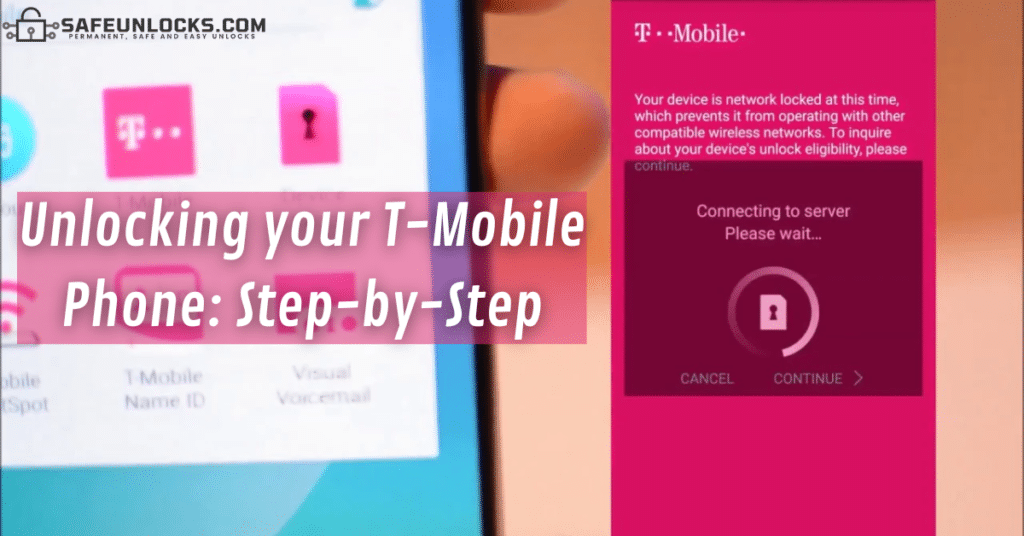
If you want to try SIM-unlocking your smartphone directly with the carrier, the best option is to use T-Mobile’s Device Unlock App, which is a mobile program your phone has preinstalled specifically to remove this lock. After you use this app, it’ll get automatically installed, but that’s only if the process is successful and you’re eligible for the unlock. Either way, here are the steps you need to follow:
- Go to your phone’s apps and look for the one in question (My Apps & Games >> Installed).
- Click on the “Devices” tab.
- Select the phone you’re trying to unlock.
- Go to “How-To” >> “Security” >> “Mobile Device Unlock”.
- Click on “Continue”.
- Select the option that says “Permanent Unlock”.
At this point, the application will start automatically validating your eligibility and unlocking the smartphone if the requirements are met. If you don’t meet the carrier’s criteria, you will see a message on your screen telling you when you can resubmit the request to try again.
What do I do if the T-Mobile Device Unlock App is not working?
First of all, keep in mind that this app is only for Android phones because iPhones get automatically unlocked once eligible, but if that’s not the problem, it might be because you’re not eligible. Anyway, if for any reason the app fails, just call T-Mobile’s customer support, but remember that the process takes up to 14 business days and you’ll still need to meet their policies.
Unlock Eligibility Criteria for T-Mobile Devices
There are various policies and conditions you’ll need to meet if you want T-Mobile’s approval for the unlock process. These are based on the company’s unlock policy and involve aspects of both your account and phone status. The principal points to unlock a T-Mobile SIM-locked phone (and the ones why most people’s requests get denied) are the following:
- The device cannot be reported on the IMEI blacklist database.
- If the device was financed on monthly statements, it has to be fully paid for.
- You have to be in good standing with the wireless carrier.
- You must have met the minimum period of active service using the T-Mobile network.
- The phone can’t have any software modifications like rooting or jailbreaking.
How long will the Process take if my Phone is Eligible for Unlock?
Well, this depends on the method you choose, if you submit the request and complete the unlock using the T-Mobile App, they’ll SIM unlock your device within two business days. However, as we mentioned, if the app is not working and you place the request by contacting the T-Mobile support team. It can take up to 14 working days because they need to do the eligibility verification and generate your code manually.
How to Network unlock T-Mobile without meeting any Policies?
In SafeUnlocks, we understand how complicated it might seem to go through the process and requirements verification that the carrier imposes. That’s why we came up with a solution to automatically and remotely unlock any iOS or Android device from TMobile, no matter if the device is eligible or not:
- It doesn’t matter if the phone is not paid in full.
- The status of the line on your account doesn’t matter.
- You won’t need the phone’s proof of purchase.
- It doesn’t matter if we’re talking about a second-hand device.
- While with the carrier you must be in good standing, with us it doesn’t matter.
As you see, it’s not like certain eligibility requirements apply, on the contrary, there are no conditions at all! So, if you were struggling to unlock your phone via the traditional way, stop worrying because we can give you an unlock code in a matter of minutes and without hindering the process.
How do I know if my Mobile Device supports Remote Unlocks?
This is one of the greatest advantages that SafeUnlocks’ innovative service has to offer: all phones are compatible with our method! That’s because the unlock tool is not invasive at all and there’s no need to install it on your phone, so it’s not like it has to support our software. The whole unlock is 100% online, processed from our remote servers, and generates an unlock code based on the IMEI number of the mobile phone, which makes it 100% compatible with it.
Unlock your Device with SafeUnlocks in 3 Steps!

The process with SafeUnlocks is incredibly easy, you don’t need to contact us or perform complicated procedures, not at all. On the contrary, you just need to have handy the IMEI number of the smartphone, place the unlock request, and then we take care of the rest; we got you covered! Let’s see the easy instructions to unlock your T-Mobile device from the comfort of your home.
Submit your Request
First of all, go to SafeUnlocks.com >> Services, select the type of lock you need to remove (Carrier Lock), and then choose the country in which you’re located. That will take you to our carrier unlock starting module, where we’ll ask you to provide some key details for your order. We will need your name, your email, the specific brand of the phone (Samsung, Google Pixel, Apple, etc.), and its IMEI number; then, you’ll be able to submit your request.
Make the Payment
After placing the order, you’ll be asked to create an account with us for security reasons, but that’s only if it’s your first time using SafeUnlocks‘ services. If not, simply log into your account and make the $1 payment, this is the small amount we charge each customer for each device we unlock.
Wait until we Unlock the Phone
After following the steps, you’ll simply need to wait for a little while we process your request, which can take up to an hour depending on the number of orders active at the moment. As soon as we finish, we will send you a confirmation via email, so just make sure to have a stable Wi-Fi connection at all times and that’s it.
How do I Make Sure my Phone is already Unlocked?
Once you finish, we’re pretty sure you’ll want to confirm everything worked and the smartphone can now get connected to all networks in the US. So, we’ll leave here the principal alternatives you have to verify the T-Mobile unlock process was successful, keep reading and check your phone’s lock status in minutes!
Try using a SIM Card from a Different Carrier
The first thing to do is remove your T-Mobile SIM from the phone and get a new one from any other network provider like, for example, AT&T, Verizon, or any other. Then, insert the new chip on the device and make sure it can get connected to the new network and can operate without restrictions.
Try using an Online IMEI Checker
Another option would be to use one of those websites that can give you a report of your phone’s SIM lock status for free, all in a couple of seconds (the one we recommend is IMEI.org). All you have to do is visit the checker of your preference, provide them with your phone’s IMEI number, and wait until the system gives you the results.