Skip to content

Leading IMEI Unlock Service | Bell Canada

Fast & Reliable Blacklist Unlock Service

Is your Bell phone blacklisted due to a blocked IMEI? SafeUnlocks offers a quick and affordable solution to clean your blacklisted IMEI for just $2! Restore full network access and get back to using your device without hassle, all from the comfort of your home. Rest assured, our expert team handles the process safely and securely. Contact SafeUnlocks today and get your phone back in action!

In this SafeUnlocks article, we will share with you everything you need to know about unlocking IMEI most practically so you can do it quickly and without so many inconveniences. Learn with us what to do with a blacklisted Bell phone, how you can check this number, and what the best online alternative is to unlock your device and IMEI once and for all. So check now how to complete this process with and without Bell. Let’s get started!

Why is the IMEI Code so Important for the Blacklist?

Why is the IMEI Code so Important for the Blacklist?

Since the IMEI is a unique identifier, it is easier for mobile carriers to track and register these numbers under their network. That’s why when a device is reported, the first thing they check is the IMEI so they can look for the model, country of origin, and current network to place the blacklist lock. The IMEI is also used to check your current Bell network unlock status or blacklist status. You can do this process online with an IMEI checker or with this network provider. 

Another reason why this number is so significant is that you can use it for other phone unlock procedures, so it is always good to have it handy. The best and quickest way to get it is by dialing *#06#, but you can also check the settings of your Android or iOS device. The thing is that you will always need it for any procedure, especially if you are trying to get rid of the blacklist report with SafeUnlocks or Bell. 

Can Bell Canada and other Carriers see my IMEI number?

They can definitely see and use it when managing your device on their network. That’s why when a phone is reported, the other carriers can deny the service, as they can check the IMEI and its status at any time. The same happens when your Bell device has a network restriction, as the other carriers can check the IMEI and see that it is only compatible with Bell, which tells you that it is not possible to use a SIM card from any network besides that one.

2 x 6

What do you need to Unlock your Bell? 

To unlock your Bell phone from the reporting database, you must provide some basic information like your name, phone number, ID, and IMEI number. After that, you must complete other criteria like presenting a valid proof of purchase, your account number (if you have one), and being up-to-date with all your payments. You don’t need to pay anything; the process should be free, and the cleaning procedure can take several days. 

Can Bell Canada Reject an IMEI Unlock Process?

Yes, they can reject a request if the user doesn’t meet all the requirements, is not the original owner, or the phone was reported lost or stolen. This kind of issue happens often with secondhand devices, and that’s why it’s so complicated sometimes to get information about how to clean a report with the bell service. Still, you don’t need to worry, as even if it gets rejected, you still have an online unlock service and solution that will clean your phone’s IMEI number without so many hassles, called SafeUnlocks. 

2 x 10 or 2 x 8

If my Phone is not Working can it still be Reported?

Even if your smartphone is no longer working, it can still be reported using its IMEI number. The IMEI number is associated with your device, not necessarily linked to its hardware and software functionality. So, basically, even if the phone is locked because you lost the password or it doesn’t turn on anymore, it will still be added to the list if a report is made, and it will have the same network restrictions. 

Can I Exchange IMEI Numbers with Another Device?

This method to unlock your phone is not recommended, as it will damage the IMEI and can have legal complications. Changing or modifying an IMEI in Canada is illegal, and you can have fines or other problems if Bell or another carrier discovers that the IMEI has been altered and the phone is no longer safe. So, instead of doing that, you can take the locked device to SafeUnlocks and use one of the safest methods to unlock your IMEI. 

Can you Unlock your IMEI Yourself without Bell?

Can you Unlock your IMEI Yourself without Bell?

The best chance of unlocking your Bell device is at SafeUnlocks! If you want an alternative where you can create your own unlock request and do the procedure on your own without having to contact Bell Mobility, then you can do it with our online tool in minutes. To complete the unlock, you only need a few pieces of information, and with that, you will have complete access to the servers that will clean your device and permanently unlock your IMEI from this reporting database. 
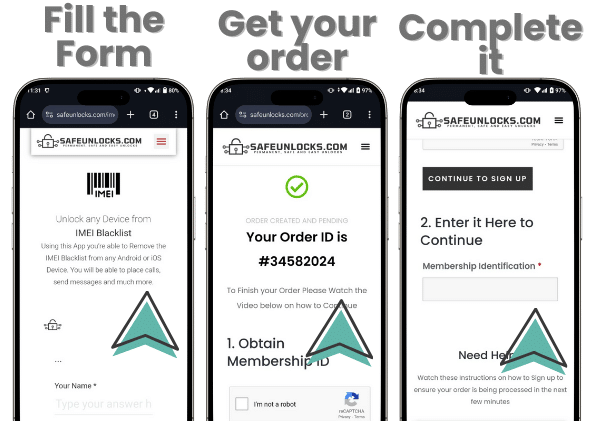
Use SafeUnlocks Now to Unlock IMEI Bell Online!

To use our Bell unlock service, you only need to fill out a quick form with your name, email, manufacturer (iPhone, Samsung, Motorola), and the Bell IMEI. This information will create an order and help us unlock the device, so make sure it is correct so you don’t need to repeat the process. When you are done there, please follow these simple three steps to complete your request.

  1. Complete your order by going through a quick registration process with us.
  2. Make the $2 payment to use our IMEI unlocking service.
  3. Wait for the servers to finish the cleaning process and restart your phone

That’s all you need to do! After that, your phone will be completely unlocked and ready to use with your regular mobile network and Bell SIM card. There is no need to install software, complete a lot of unnecessary criteria, or even go out of your home, as you can do this process online and safely with us. 

Use SafeUnlocks Now to Unlock IMEI Bell Online!

IMEI Blacklist Unlock Service

Identifier Type *

You can find your IMEI by dialing *#06# on your device or in Settings → General → About.

How to compare Bell IMEI blacklist / lost-stolen report in Canada

When a phone is reported lost, unpaid, or seized, the IMEI can be blocked for service even if the SIM tray is open. For Bell IMEI blacklist / lost-stolen report in Canada, start with an official IMEI check, then compare what each shop says they can change.

Bell in Canada still controls the source record for this lock type. A comparison page cannot replace that desk. Use it to see which shops disclose the same limits the official policy already states in 2026.

Before you compare shops for Bell IMEI blacklist / lost-stolen report in Canada, collect the 15-digit IMEI (dial *#06#), a photo of the exact lock screen, and proof you are allowed to request a change. The IMEI format helper at /random-imei-generator-online is only for checking digit layout. It does not create a live identity for a real phone.

This URL is a 2026 comparison article, not a checkout for SafeUnlocks labor. Partner forms, if present, belong to the services being compared. Keep receipts and policy pages from those parties, not from a brand claim that ā€œwe unlockā€ this handset.

Treat the body below as source material from the original guide, and treat this briefing as the portal layer. Together they should tell you whether Bell IMEI blacklist / lost-stolen report in Canada is a SIM issue, an account lock, or a database flag before you leave the IMEI blacklist guides.

Country context matters for IMEI blacklist / lost-stolen report in Canada. Local databases, consumer unlock laws, and prepaid versus postpaid rules are not copied from another market. Bell rules sit on top of that. A 2026 listing that ignores that geography is a weak comparison.

Mixing lock types is how people buy a carrier unlock for an iCloud screen. Bell IMEI blacklist / lost-stolen report in Canada is labeled imei so the related links stay in family. Leave the page if the device is showing a different lock.

Red flags when you compare Bell IMEI blacklist / lost-stolen report in Canada listings in 2026: guaranteed success with no IMEI check, ā€œone tapā€ claims, and copy that never names the lock type. Prefer shops that state refund rules, processing windows, and what happens if the official desk refuses the request.

Plan Bell IMEI blacklist / lost-stolen report in Canada as a request with a queue, not a download. If the lock is imei, the clock starts when the party that owns the record accepts the case, not when you paste an IMEI into a form.

Ownership and payoff sit above lock type. Confirm both before you compare prices for Bell IMEI blacklist / lost-stolen report in Canada. A cheap quote on a financed or reported device is not a bargain; it is a mismatched offer.

You now have a 2026 briefing for Bell IMEI blacklist / lost-stolen report in Canada: lock family, official desk, checks, and the red flags that show up in ads. Continue into the original guide below and the related IMEI blacklist guides when you want a sibling country or brand. Stay on the lock type you actually have.