Skip to content

Unlock MetroPCS Phone (Metro by T-Mobile) | No Unlock Policy

Unlock Your MetroPCS by T-Mobile Device

Just $2 Minutes to Complete

Unlock your MetroPCS by T-Mobile device quickly and affordably with SafeUnlocks—trusted by thousands for fast, secure service. For just $2, you can remove carrier and network restrictions and start using your phone with any provider worldwide. Our process is fully online, compatible with nearly all phone models, and takes just minutes to complete. No technical skills needed, no waiting weeks—just simple, effective unlocking. Get started now and enjoy the freedom your device was meant to have!

Quick & Affordable - Just $2
Works with Any Provider Worldwide
Compatible with Nearly All Models
No Technical Skills Required
Trusted by Thousands
>

In SafeUnlocks, we count on an innovative unlocking program with implemented algorithms, which are the same carriers normally use to create SIM unlock codes themselves; interesting, right?

Well, today we brought you an easy guide on how to unlock MetroPCS phones using this external yet guaranteed method, which comes with all you need to know about the network lock and its elimination.

Keep reading and learn how to free your phone from its carrier in minutes!

Unlocking MetroPCS Phones: Device Unlock App
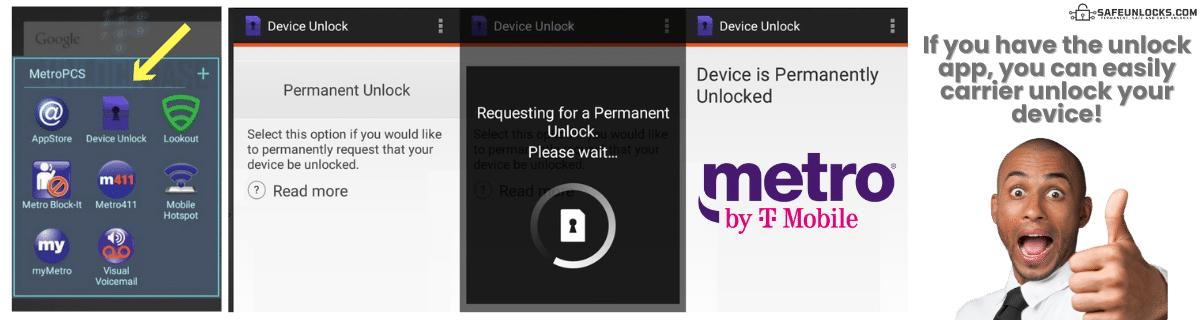
Unlocking MetroPCS Phones: Device Unlock App

When your smartphone becomes eligible, you normally receive a notification via SMS, and the phone is automatically unlocked two days after that, but what happens when you never get it? Well, in those cases, you can verify your eligibility status using the carrier’s Device Unlock App, which comes preinstalled in most MetroPCS phones, and use it to start the lock removal process.

What if the App Doesn't Show Up on my Phone?

Newer models may or may not have this app anymore, as the MetroPCS unlock app is kinda outdated and not that necessary anymore, but it is still present in many older models. Still, if the app doesn't show up for you, you can try the following:

1
Go into Settings > Apps > All Apps
2
Search for "Unlock" or "Device Unlock"
3
If you find it and it's disabled, re-enable and use it
4
If not, check your Settings for "Network Unlock" or contact Metro's support

Are all Unlocks with MetroPCS processed through the Device Unlock App?

Not really. This mobile application is only for certain Android devices, so for iPhones and phones that don't support it, the procedure changes.

Android Devices

Use Device Unlock App

iPhones & Others

Different procedure required

Most people get their smartphones automatically unlocked, but if not, they may be asked to run a factory reset and complete some steps in the device's settings. If you want to learn a little more about how to unlock your phone directly with MetroPCS, go to their "Metro by T-Mobile Phone Unlock Policy" guide and scroll down until you see the instructions.

MetroPCS SIM-Unlock Requirements

Check these criteria before requesting unlock
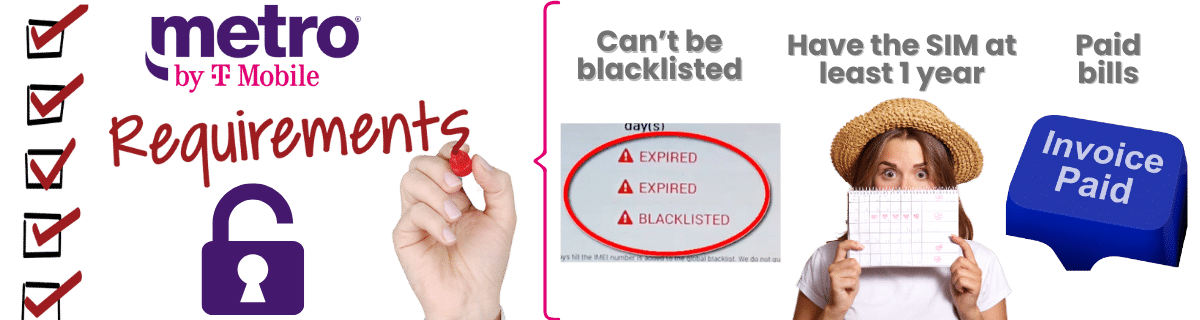
What are the Requirements to SIM Unlock a Phone from MetroPCS
Policies vary by contract type • Military exception applies

Clean IMEI

Cannot be on IMEI blacklist database

Service Period

Must meet minimum active service period

Usually 1 year

Good Standing

Account must be in good standing with carrier

Not Lost

Smartphone cannot be in lost mode

Ready to unlock? Contact MetroPCS once you meet all criteria

How Long does MetroPCS take to Unlock Phones?

This depends on the specific case because this procedure requires the approval of different departments, and they all actually need to approve the request. However, just to give you an estimate, it takes a minimum of 48 hours, but it can be a lot longer if you don’t meet one of the requirements or need to present any documentation at any point.

Can I Unlock a MetroPCS Phone even if it's Secondhand?

The Problem

When you buy a second-hand device, it is necessary to make certain verifications to protect your investment, which definitely includes making sure the phone doesn't come locked to a carrier. Unfortunately, a lot of people forget about these types of important verifications and end up with a device restricted to a single network. The question then is: can those devices be unlocked?

MetroPCS Direct

Not Possible

Directly with MetroPCS, that's not really possible because one of the main unlock eligibility requirements is that you must be the phone's original owner, so Metro's representatives won't help you.

SafeUnlocks

Available

However, don't worry, because you still have a chance thanks to SafeUnlocks' innovative service, which can process any unlocking request, no matter if the carrier authorizes it or not.

Can I Unlock a MetroPCS Phone even if it’s Secondhand?

Want to Permanently Unlock MetroPCS? Here’s what you need!

When you unlock your device using SafeUnlocks’ online tool, you get an unlock code known as NCK or NUC code, which you have to enter into the phone to remove its network restrictions. Now, for you to get that code, you’ll need to provide us with your name, email address, the brand of the device, and most importantly, the phone’s unique IMEI number. With those key details, our unlock service will automatically generate your corresponding MetroPCS Network Unlock Code for you to free your device and use it with any carrier in the US.

Where can I find my Phone’s IMEI Number?
MetroPCS

Where can I find my Phone's IMEI Number?

This code is incredibly important. Even if you try to unlock your phone using the Device Unlock App that MetroPCS offers when you're eligible for unlocking, you'll still need it. Let's see the easiest ways you can find your phone's IMEI:

1

Settings

Go to your device's settings app (general >> about >> IMEI); you'll find key device specifications including IMEI and model numbers.

2

Original box

This code comes printed on your phone's original packaging; check for a sticker with the device's IMEI along with other general information.

3

SIM card tray

Most smartphones have their IMEIs printed on the SIM tray, so just take it out and check if you see it there.

Do SafeUnlocks’ Unlock Codes work on iOS?

Of course, they definitely do, because all unlock codes are generated specifically for each smartphone, so the service is effective and guaranteed for any device, regardless of its brand. This means it doesn’t matter if you have an iPhone, a Samsung, or any other type of phone; either way, we’ll ask for its unique IMEI number and generate a code exclusively for that handset.

How to unlock your Device from MetroPCS with SafeUnlocks
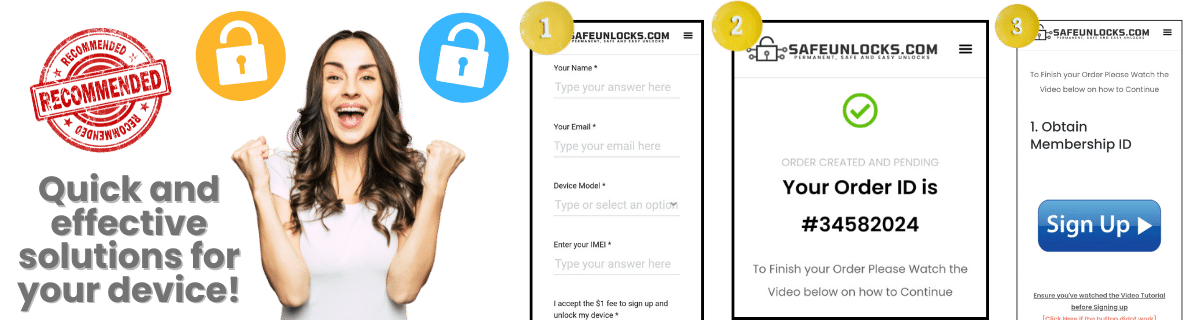
How to unlock your Device from MetroPCS with SafeUnlocks

This process is incredibly easy. All you need to do to unlock a phone with us is send us your request, and that's it. We'll take care of the rest with our automated process. Here are the quick steps you need to follow in order to unlock your phone from the MetroPCS network with us:

1

Visit SafeUnlocks

Visit SafeUnlocks.com and go to the "Carrier Lock" section.

2

Fill the form

Fill out the form on your screen with the required information.

3

Submit & activate

Submit your request and activate it via the confirmation email you receive.
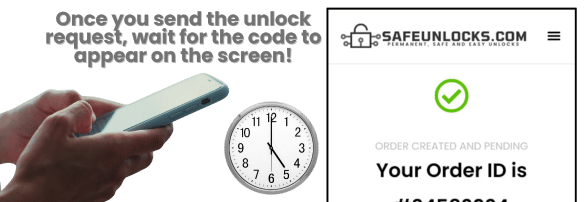
Automated process takes care of everything!

What will happen after I send my Request?

After you complete the unlock process, we’ll take a couple of minutes to generate your Metro unlock code (it won’t take more than an hour). Remember that this service is not exclusive to Metro; on the contrary, it’s available to users from all carriers, including AT&T and Verizon, among others. Just follow the steps and we’ll help!

What will happen after I send my Request

How to confirm your MetroPCS Phone is Unlocked

Once you complete the process, you might want to confirm whether it was successful and your device is now open to any carrier or not. Well, there are various ways you can do this. Let’s see together the different ways you can identify an unlocked phone to determine whether our online tool was effective or not. Keep reading!

Check that your phone is no longer locked

Method 1

Insert a SIM card from a New Carrier!

One of the easiest ways to verify your phone's carrier-lock status is by getting a chip from a network provider different from the one locking your phone in the first place. In your case, you'll need to get a non-Metro SIM card, insert the chip into your phone, and see if it works (if it does, your smartphone is now unlocked).

1
Get non-Metro SIM
2
Insert in phone
3
Test if it works
Method 2

Run an IMEI Check!

Another alternative is to use any of the different SIM-lock checkers available on the internet, which can give you a full report of your phone's status in seconds. Simply enter your phone's IMEI on the page after you unlock the device, and wait for the website's results, which should say that your phone has "No SIM Restrictions."

Expected result: "No SIM Restrictions"

How to compare Metro by T-Mobile carrier / SIM lock in the United States

If a phone refuses every SIM except the original brand, you are looking at a carrier lock. Metro by T-Mobile carrier / SIM lock in the United States pages on SafeUnlocks compare how that release is usually requested, what documents operators ask for, and which listing details matter before you pay anyone.

The first comparison point is the official desk: Metro by T-Mobile in the United States. Ask whether the account is in good standing, whether a waiting period applies, and whether the requester must be the account holder. Shops you compare later should be measured against that 2026 policy, not the other way around.

Three artifacts stop most wasted orders: the IMEI, the on-screen lock wording, and account-holder proof. For Metro by T-Mobile carrier / SIM lock in the United States, skip any checkout that will not say which of those it needs. Use /random-imei-generator-online only to understand IMEI length and checksum shape.

Read “Unlock MetroPCS Phone (Metro by T-Mobile) | No Unlock Policy” as a briefing. SafeUnlocks recommends and compares. Any paid work happens off this site with the party you choose after you have the lock type and the official rules in hand.

Use this page in three passes: confirm the lock type matches Metro by T-Mobile carrier / SIM lock in the United States, read the official path, then open the related carrier unlock guides for the same family. Internal links on this URL are there so you stay inside the right lock bucket instead of bouncing to a random how-to.

the United States does not share one global unlock desk. For carrier / SIM lock, use sources that name this market. Metro by T-Mobile rules sit on top of that. Pairing this page with a different country’s guide would be a bad hreflang match and a worse shopping decision.

Keep four buckets separate while you read about Metro by T-Mobile carrier / SIM lock in the United States: carrier SIM lock, iCloud or Google account lock, PUK on the card, and IMEI blacklist. This URL is filed under carrier. If the on-screen text belongs in another bucket, switch to that hub instead of forcing this page to answer it.

If a Metro by T-Mobile carrier / SIM lock in the United States ad uses “leading provider” language and hides the operator policy, score it down. Comparison means you can place that listing next to the official desk and see the gap.

Keep a dated note of when you asked Metro by T-Mobile carrier / SIM lock in the United States to be reviewed. That stamp is more useful than a marketing countdown. SafeUnlocks will not invent a publish date or a turnaround to make the page look fresher.

An unpaid balance, lease, or insurance claim can block Metro by T-Mobile carrier / SIM lock in the United States even when the hardware is in your hands. That hold is a billing or police record, not a missing unlock code. Comparison copy that skips finance status is incomplete.

If this briefing and the older body copy disagree on tone, trust the lock-type split and the official-desk rule. Metro by T-Mobile carrier / SIM lock in the United States should still be compared, not purchased as a mystery SKU from a banner.