Carrier Unlock Total Wireless Phone: How to Unlock Your Device
Compatible with All Total Wireless PhonesRemote & Safe UnlockingNo Contract RequiredPermanent Results
Is your Total Wireless phone carrier locked and you want the freedom to use any SIM card? We offer a professional tool unlock service to remove the network restriction from your Total Wireless device. It's completely remote, 100% safe, effective, and works without needing to contact the carrier or wait for eligibility!
✅ Trusted by Thousands of Users | 🔧 Professional Methodology | 🛡️ Safe & Legal | 📆 Updated
How to Unlock Total Wireless Phone for Free in 10min | Guide
📱 Did you know you can unlock your Total Wireless phone? Most people don't — but they should! Unlocking gives you real benefits: higher resale value 💰 and the freedom to use any carrier worldwide 🌍.
In this guide, we'll walk you through the unlocking process step by step ⚡. It may sound confusing, but don't worry — we've got you covered. Learn exactly how to unlock your Total Wireless phone and start enjoying carrier freedom today 🔓.
What is Total by Verizon? Are Total Wireless Devices Good?
📡 Total Wireless is a mobile virtual network operator (MVNO) that uses Verizon's coverage to provide service all over the United States 🇺🇸. They offer both individual and family plans at competitive prices. However, there's a catch: they won't unlock your phone unless you've had service with them for at least 12 months — which can be a problem if you want to switch carriers or travel internationally ✈️.
🔒 Does This Only Happen with Total Wireless?
Unfortunately, no. Most carriers like Tracfone or T-Mobile SIM-lock the phones they sell for at least 60 days 📅.
Why? Because mobile operators want you to stay on their network and keep using their services instead of switching to another carrier 🔗. It's an industry-wide practice, not just Total Wireless.
📋 What Do I Need for Total Wireless to Unlock My Phone?
To get an official unlock from Total Wireless, you must meet their eligibility criteria ✅:
• Your phone cannot be reported as lost or stolen
• You must have completed 12 months of active service
• The device must be registered in your name
• Plus other carrier-specific requirements 📝
🔓 Total Wireless Phone Unlock Tool
📱 How to Check if Your Phone is Locked
1Power off your Total Wireless phone completely
2Remove the current Total Wireless SIM card
3Insert a SIM from a different carrier (AT&T, T-Mobile, etc.)
4Power on your phone and check the result
📊 What You'll See:
✅Shows signal bars = Phone is UNLOCKED
🔒Error message = Phone is LOCKED
❌No service = Phone is LOCKED
1Open Settings on your phone
2Go to General → About (iPhone) or About Phone (Android)
3Look for "Carrier Lock" or "Network Lock" status
4Check if it says "No SIM restrictions" or "Locked"
📊 Settings Results:
✅"No SIM restrictions" = UNLOCKED
✅"Unlocked" = UNLOCKED
🔒"SIM locked" = LOCKED
🔒"Carrier Lock: On" = LOCKED
1Dial *#06# on your phone to display your IMEI
2Write down the 15-digit IMEI number
3Visit an IMEI checker website or contact Total Wireless
4Enter your IMEI to check the lock status
💡 IMEI Tips:
📞Call Total Wireless at 1-866-663-3633
🌐Check online at totalbyverizon.com
⏱️Results are instant with IMEI check
💡Pro Tip: The SIM swap test is the most reliable method to confirm if your phone is locked. If you don't have another carrier's SIM, ask a friend or family member to borrow one for a quick test.
🔍 Common Signs Your Phone is Locked
🟢
"No SIM restrictions" — Good news! Your phone is already unlocked and can work with any compatible carrier.
🟡
"SIM Not Supported" — Your phone is locked. It only accepts Total Wireless/Verizon SIM cards until unlocked.
🟡
"Invalid SIM Card" — The phone is carrier-locked and rejecting the non-Total Wireless SIM you inserted.
🔴
"Network Locked" — Definitely locked. You'll need to unlock before using another carrier.
🔴
"Enter SIM Network Unlock PIN" — Phone requires an unlock code. Contact Total Wireless or use a third-party service.
🟣
"Contact Carrier" — Critical lock. The carrier has restricted the device and requires direct contact to resolve.
📵
No signal with new SIM — Phone shows "No Service" or "Emergency Calls Only" when using a non-Total Wireless SIM card.
🔄
Stuck on activation — Phone keeps trying to activate or asks for carrier credentials when using a different SIM.
🚫
Immediate SIM rejection — Phone instantly displays an error as soon as you insert a non-compatible SIM card.
✅
Works with any SIM — Phone accepts different carrier SIMs and shows signal = Already unlocked!
📱Remember: Total Wireless uses Verizon's network, so your phone might work with other Verizon MVNOs even while locked. The true test is with AT&T or T-Mobile SIMs.
Total Wireless Unlock Benefits: When to Unlock a Total Wireless Phone?
📱 Having a phone from a carrier isn't a bad idea — they offer many perks and reliable service. If you have problems, you can contact them for support. However, this also ties you to their policies and, in most cases, long-term contracts lasting 12 months. Here's why you should consider unlocking your Total Wireless phone:
✈️
Save on International Travel
Travel often? Lower your roaming costs by choosing any local carrier at your destination, getting a plan, and enjoying their networks instantly.
💰
Higher Resale Value
Want to sell your old phone? On the second-hand market, unlocked phones sell at higher prices and much more easily.
🔓
Complete Carrier Freedom
Unlocked phones give you more freedom: use any carrier you wish, get early updates, and avoid carrier bloatware.
🌍 Unlock Your Device = Use It Worldwide!
Unlocking your device from Total Wireless means it's no longer limited to the Verizon network — even if you have an active service plan with them. Once unlocked, your phone can work with SIM cards from carriers globally, including Straight Talk, Simple Mobile, T-Mobile, and AT&T, plus international carriers like Vodafone or Movistar. Travel freely without expensive roaming fees! ✈️
🔑 How Do I Unlock My Total Wireless Phone?
There are several ways to unlock your phone. The most common is through your carrier — once you've fulfilled your contract and paid off the phone, you can request an unlock. However, they may charge a fee and the process can take days. A faster, more affordable option is using a third-party service. Today, we recommend the best unlocking service on the internet: SafeUnlocks ⚡.
What is the Total Wireless Device Unlocking Policy?
📋 To use a new SIM card from a different carrier, your phone must meet certain requirements that are not always easy to obtain — as this is not something beneficial for a carrier. Here's the checklist you need to be eligible for unlock by Total Wireless:
✅
Good Standing with Account
📅
60 Days Active Service
👤
Original Owner of Phone
💳
Device Fully Paid Off
📜
Clean History with Company
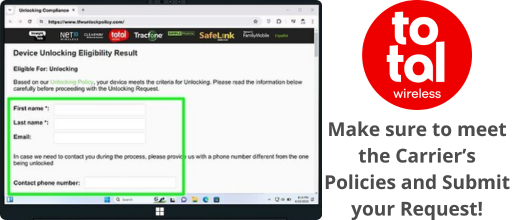
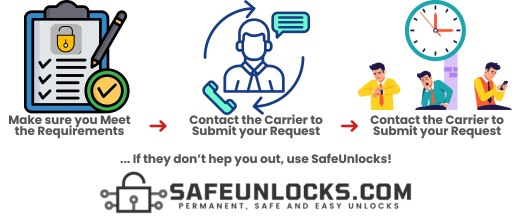
If you meet all of these requirements, you need to call Total Wireless and request the unlocking of your phone 📞. You will likely receive an email if your phone is eligible for unlocking; if not, they will also notify you explaining the reasons why.
🤔 How Do I Know If My Device Will Be Unlocked or Not?
That's hard to tell because, from this point on, it will depend on whether you meet the unlocking policies established by your carrier, which in this case is Total by Verizon. If they consider that the device is eligible, the customer care agent will approve the request — but if not, they'll deny it ❌.
💡 Good news! You can start your unlock request only with your IMEI if you use a third-party tool. Using this alternative method will remove all the headaches that unlocking your phone with the carrier might cause — no waiting, no eligibility requirements, just results! ⚡
Unlocking Total Wireless Phones with SafeUnlocks: Advantages
🏆 SafeUnlocks is the best option to unlock your phone, and we have strong reasons to tell you this. We provide all our customers with fast, safe, affordable, and high-quality services — guaranteed to unlock your Total Wireless phone. Here's why you should choose us:
🎯
99.9%
Unlock Success Rate
We can unlock Total Wireless phones no matter the brand. Plus, we unlock devices from most carriers worldwide.
⚡
5 min
Average Processing Time
We perform the unlocking within minutes, with an average unlocking time of just 5 minutes per phone.
💰
$1
Per Unlock + Lifetime Guarantee
The lowest price on the internet! No trial, no hidden fees — permanent unlock with lifetime guarantee.
🛡️ Does SafeUnlocks Program affect my Phone?
▼
Not at all! What we mentioned about losing your phone warranty applies to other unlock methods that involve rooting/jailbreaking your phone or installing risky APK files. However, as SafeUnlocks' Total Wireless lock removal service doesn't require any of that, it is 100% safe to fix your phone with us ✅.
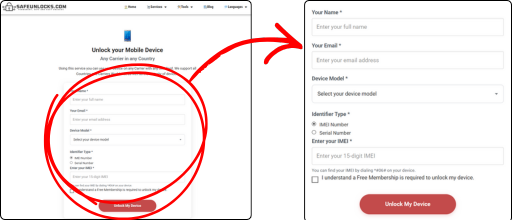
To unlock a Total Wireless phone using our lock-removal software, provide us with:
📱
Phone Brand
🔢
IMEI Number
👤
Your Name
📧
Your Email
Your IMEI number is crucial — it verifies the brand, model, and carrier.
📲 Is This Device Unlocking Service Compatible with Both Android and iOS?
Absolutely! SafeUnlocks' unlocking service is fully compatible with both Android and iOS devices. Regardless of whether you have an Android smartphone or an iPhone, our service can automatically unlock your device without asking you to meet any eligibility requirements 🎉. All you have to do is place your request, activate it, and follow the steps on the screen!
🚀 Steps to Unlock Your Phone with SafeUnlocks
With us, you can unlock your phone in just minutes. The process is simple, fast, and doesn't require any technical knowledge. Just follow these easy steps:
1
🌐 Visit Our Official Website
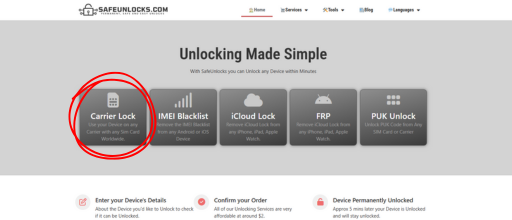
First, head over to the SafeUnlocks website to start your unlock request. Click the button below to go directly to the carrier unlock page:
Once on our page, provide the details of the phone you want to unlock: device model, IMEI number, and an email address where we can contact you. With this information, we can open your unlocking request.
3
🎁 Get Free Membership & Unlock
To access all our services and perks, you'll need a free membership — just sign up with your email and follow the simple on-screen steps. That's it! Your phone will be unlocked in minutes.
💬
Need More Help? We're Here 24/7!
If you need more information about carrier unlock or our services, visit our official webpage or contact our customer service, available 24/7/365. We'll get back to you as soon as possible. SafeUnlocks — permanent, easy, and fast unlocks! ⚡
How to compare device lock
Start by naming the lock you actually see on screen. For device lock, the next step is official policy or a documented shop process, not a generic “unlock now” button.
the original operator or maker still controls the source record for this lock type. A comparison page cannot replace that desk. Use it to see which shops disclose the same limits the official policy already states in 2026.
Before you compare shops for device lock, collect the 15-digit IMEI (dial *#06#), a photo of the exact lock screen, and proof you are allowed to request a change. The IMEI format helper at /random-imei-generator-online is only for checking digit layout. It does not create a live identity for a real phone.
This URL is a 2026 comparison article, not a checkout for SafeUnlocks labor. Partner forms, if present, belong to the services being compared. Keep receipts and policy pages from those parties, not from a brand claim that “we unlock” this handset.
Treat the body below as source material from the original guide, and treat this briefing as the portal layer. Together they should tell you whether device lock is a SIM issue, an account lock, or a database flag before you leave the device lock guides.
Mixing lock types is how people buy a carrier unlock for an iCloud screen. device lock is labeled generic so the related links stay in family. Leave the page if the device is showing a different lock.
Red flags when you compare device lock listings in 2026: guaranteed success with no IMEI check, “one tap” claims, and copy that never names the lock type. Prefer shops that state refund rules, processing windows, and what happens if the official desk refuses the request.
Plan device lock as a request with a queue, not a download. If the lock is generic, the clock starts when the party that owns the record accepts the case, not when you paste an IMEI into a form.
Ownership and payoff sit above lock type. Confirm both before you compare prices for device lock. A cheap quote on a financed or reported device is not a bargain; it is a mismatched offer.
You now have a 2026 briefing for device lock: lock family, official desk, checks, and the red flags that show up in ads. Continue into the original guide below and the related device lock guides when you want a sibling country or brand. Stay on the lock type you actually have.
If you landed on /how-to-unlock-total-wireless-phone from a country or brand that is not named in device lock, you are probably in the wrong leaf. Use the hub links rather than forcing this title (“How to Unlock Total Wireless Phone for Free in 10min | Guide”) to cover a different lock.