
Are you dealing with a locked smartphone and want to learn how to unlock US Cellular using the easiest and most practical method? Well, today is your lucky day because in this article, we’ll leave a full detailed explanation for you to have a clearer idea of how to get rid of that problem and permanently free your device.
Can Users Unlock US Cellular Phones for Free?
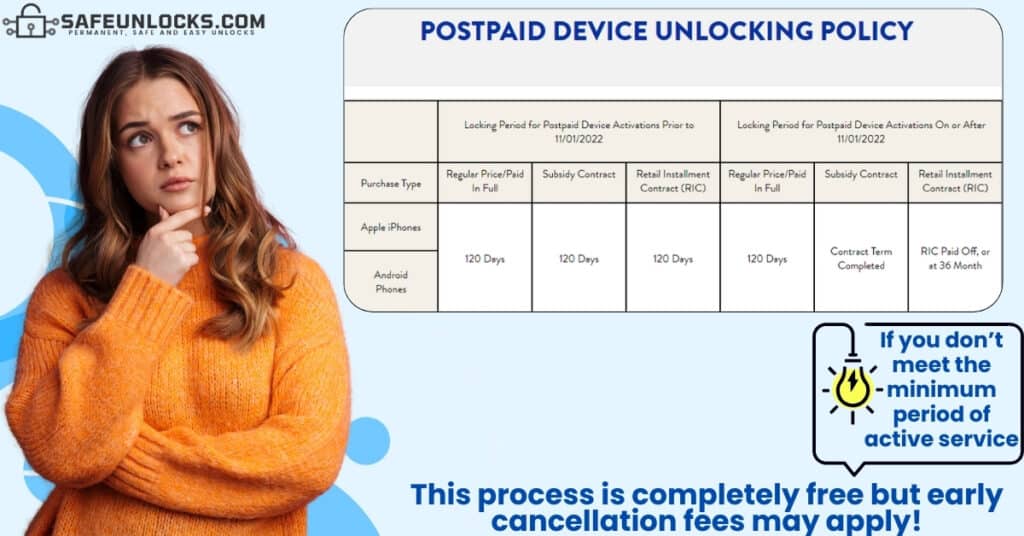
Of course, this process is 100% free of charge when it’s done directly with its network provider, and USCellular is no exception so you don’t have to worry about that. However, it’s important to highlight that unlocking your iPhone or Android device with the carrier takes from 24 to 72 hours (it can take more depending on the case). That’s why most people would rather pay a small fee in exchange for an immediate unlock like what SafeUnlocks offers, but that’s up to the person to decide what’s best for their specific situation.
What are the Device Unlocking Policies for US Cellular Users?
There are a lot of different conditions and requirements that customers need to meet to get their devices unlocked, and those are not only for the user but for the smartphone as well because it needs to be eligible. Talking about the device unlocking policies that apply to you as the service user and phone owner, it is necessary for you to:
- Have your account up to date (be in good standing).
- Be the original owner of the phone.
- Have met the minimum period of active service.
- Have met all the terms specified in your contract.
On the other hand, talking about the device you’re trying to get fixed, it cannot be reported on the IMEI blacklist database or be flagged as lost or stolen. In fact, it cannot even be in its “Lost Mode” because that interferes with the unlocking process, and remember that they might even ask you for its proof of purchase or receipt.
How can I Unlock a US Cellular Phone?
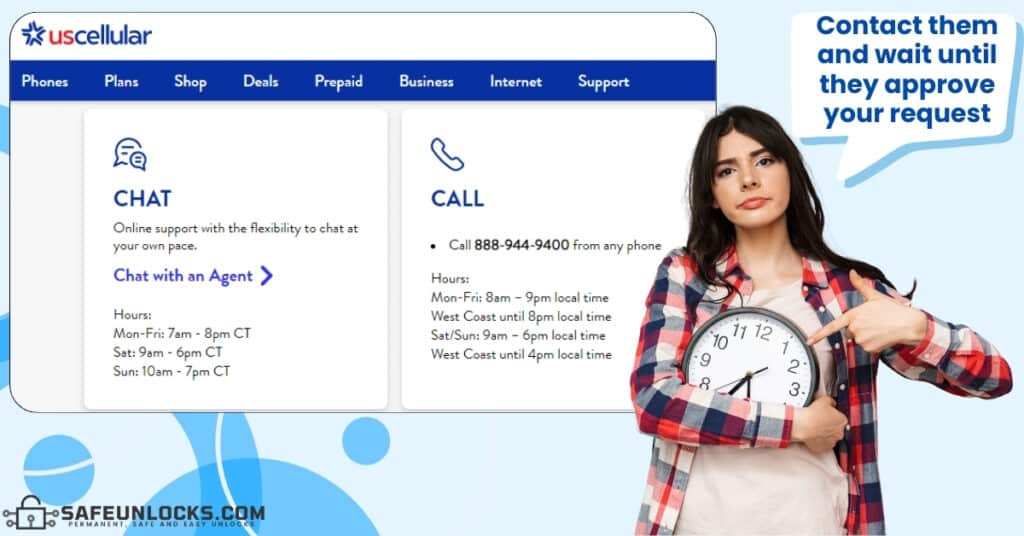
Even though other carriers in the United States count on different platforms for people to process this type of request online, with USCellular you have to contact them directly. That means you can go personally to one of their branches or call their customer support line at 611 (if you’re calling from a US Cellular phone) or (888) 944-9400 (from other numbers).
Do I need to have an Active US Cellular Account to Unlock my Phone?
Not at all, the wireless carrier must unlock your device even if you are no longer a customer and close your account. As long as the phone is bought from them and locked to their network, it is mandatory for them to process your request. However, it’s worth clarifying that the closed account must have a zero balance, you have to be on good terms with them, and of course, you need to meet all the applicable policies.
How Long does US Cellular take to Generate Unlock Codes?
USCellular’s official website, says the process takes approximately 24 hours; however, you should set your expectations to a little more time because it normally takes a couple of days. That depends on the amount of carrier unlock requests they’re processing at the time and the time all the departments take to check and approve your request. However, if you’re in a hurry and cannot wait for days to get your phone unlocked from the USCellular network, it’s best to simply use an external lock removal service like SafeUnlocks.
Unlock your Phone to other Carriers Now!
Even though contacting the network provider that is locking the smartphone is the principal method to remove the lock, these companies have a lot of policies that complicate and slow the process. That’s why unlocking a phone can be frustrating and a little stressing, and people start looking for alternatives to automatically unlock their prepaid or postpaid devices without complications.
The good news is that in SafeUnlocks, we put ourselves to the task of developing the perfect tool to get rid of the SIM lock on any smartphone, which can generate unlock codes exactly as US Cellular does. This service counts on high compatibility with devices of any operating system, brand, or phone model, and all it uses is the IMEI number!
Why do I need my USCellular’s Phone IMEI to Unlock it?
Well, the IMEI is a 15-digit code that happens to be incredibly important to unlock devices from their carriers. It doesn’t matter if we’re talking about iPhones, Samsung devices, or any other kind of phones, it is needed in all cases regardless of whether you complete the process with us or with US Cellular.
Now, as for why is this number needed, well, that’s because the IMEI contains all the identifiable information necessary so that your device is compatible with its corresponding unlock code. To find your phone’s IMEI number, you simply have to check if it’s printed on the device’s SIM card tray or dial *#06# as if you were making a call for the number to appear on your screen.
Steps to Unlock any Prepaid or Postpaid Device by IMEI
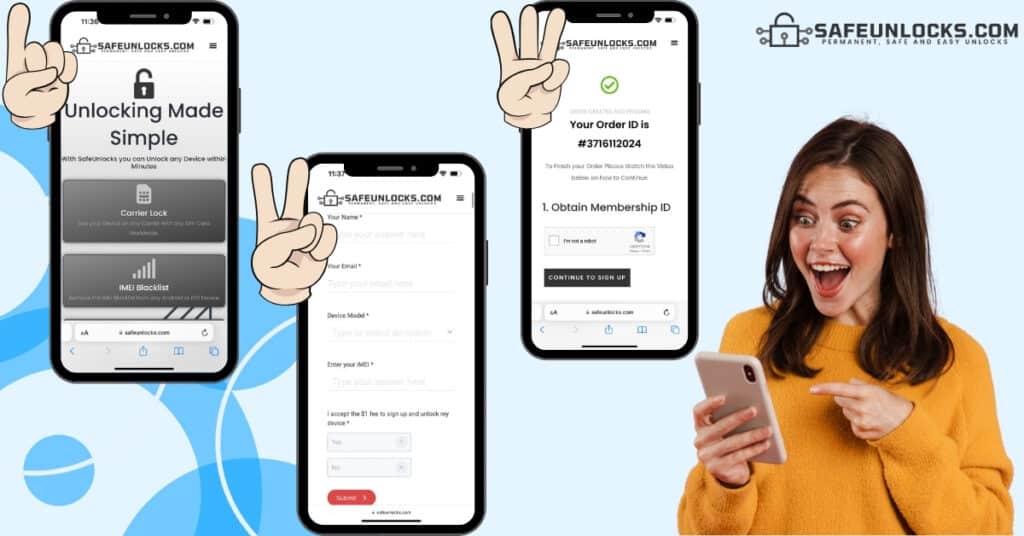
To conclude this informative guide, we want to leave here a very precise step-by-step for you to see how the whole process is. Don’t worry about it being difficult or anything, on the contrary, it comes with video tutorials and is divided into two principal sections: when you place the order and when we process it; pretty easy, right? Well, let’s see what happens on both stages and what you need to do to free your smartphone from the comfort of your home and only with a stable internet connection.
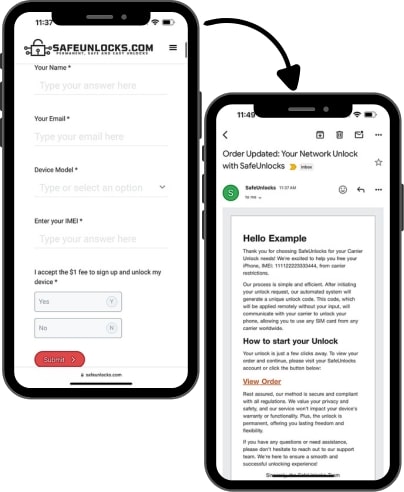
1. Place your Request
- Visit SafeUnlocks.com.
- Click on the “Carrier Lock” box.
- Fill out the form with your name, email, phone brand, and IMEI.
- Acknowledge that there is a $1 fee.
- Submit the request.
2. Process the Order
- Activate the order via email.
- Create your account.
- Make the $1 payment.
- Wait until the system generates your unlock code.
- Enter the code on the locked device.
Unlocking Phones from US Cellular: FAQs
Before showing you a quick step-by-step guide on how to use our innovative lock removal platform, we want to clarify certain key points of the process and the service we provide. We receive different questions daily about our unlocking method, and today, we’ll leave here the answers to the principal FAQs for you to have clear expectations and start knowing this service is 100% reliable.