Carrier Unlock Total Wireless Phone: How to Unlock Your Device

Compatible with All Total Wireless Phones Remote & Safe Unlocking No Contract Required Permanent Results
Carrier Unlock Total Wireless Phone - Professional unlocking service

Is your Total Wireless phone carrier locked and you want the freedom to use any SIM card? We offer a professional tool unlock service to remove the network restriction from your Total Wireless device. It's completely remote, 100% safe, effective, and works without needing to contact the carrier or wait for eligibility!

βœ… Trusted by Thousands of Users | πŸ”§ Professional Methodology | πŸ›‘οΈ Safe & Legal | πŸ“† Updated

How to Unlock Total Wireless Phone for Free in 10min | Guide

πŸ“± Did you know you can unlock your Total Wireless phone? Most people don't β€” but they should! Unlocking gives you real benefits: higher resale value πŸ’° and the freedom to use any carrier worldwide 🌍.

In this guide, we'll walk you through the unlocking process step by step ⚑. It may sound confusing, but don't worry β€” we've got you covered. Learn exactly how to unlock your Total Wireless phone and start enjoying carrier freedom today πŸ”“.

What is Total by Verizon? Are Total Wireless Devices Good?

πŸ“‘ Total Wireless is a mobile virtual network operator (MVNO) that uses Verizon's coverage to provide service all over the United States πŸ‡ΊπŸ‡Έ. They offer both individual and family plans at competitive prices. However, there's a catch: they won't unlock your phone unless you've had service with them for at least 12 months β€” which can be a problem if you want to switch carriers or travel internationally ✈️.

πŸ”’ Does This Only Happen with Total Wireless?

Does This Only Happen with Total Wireless - Carrier lock policies explained

Unfortunately, no. Most carriers like Tracfone or T-Mobile SIM-lock the phones they sell for at least 60 days πŸ“….

Why? Because mobile operators want you to stay on their network and keep using their services instead of switching to another carrier πŸ”—. It's an industry-wide practice, not just Total Wireless.

πŸ“‹ What Do I Need for Total Wireless to Unlock My Phone?

What Do I Need for Total Wireless to Unlock My Phone - Requirements checklist

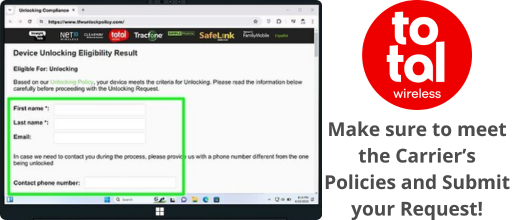
To get an official unlock from Total Wireless, you must meet their eligibility criteria βœ…:

β€’ Your phone cannot be reported as lost or stolen
β€’ You must have completed 12 months of active service
β€’ The device must be registered in your name
β€’ Plus other carrier-specific requirements πŸ“

πŸ”“ Total Wireless Phone Unlock Tool

πŸ“± How to Check if Your Phone is Locked

  1. 1 Power off your Total Wireless phone completely
  2. 2 Remove the current Total Wireless SIM card
  3. 3 Insert a SIM from a different carrier (AT&T, T-Mobile, etc.)
  4. 4 Power on your phone and check the result
πŸ“Š What You'll See:
βœ… Shows signal bars = Phone is UNLOCKED
πŸ”’ Error message = Phone is LOCKED
❌ No service = Phone is LOCKED
  1. 1 Open Settings on your phone
  2. 2 Go to General β†’ About (iPhone) or About Phone (Android)
  3. 3 Look for "Carrier Lock" or "Network Lock" status
  4. 4 Check if it says "No SIM restrictions" or "Locked"
πŸ“Š Settings Results:
βœ… "No SIM restrictions" = UNLOCKED
βœ… "Unlocked" = UNLOCKED
πŸ”’ "SIM locked" = LOCKED
πŸ”’ "Carrier Lock: On" = LOCKED
  1. 1 Dial *#06# on your phone to display your IMEI
  2. 2 Write down the 15-digit IMEI number
  3. 3 Visit an IMEI checker website or contact Total Wireless
  4. 4 Enter your IMEI to check the lock status
πŸ’‘ IMEI Tips:
πŸ“ž Call Total Wireless at 1-866-663-3633
🌐 Check online at totalbyverizon.com
⏱️ Results are instant with IMEI check
πŸ’‘ Pro Tip: The SIM swap test is the most reliable method to confirm if your phone is locked. If you don't have another carrier's SIM, ask a friend or family member to borrow one for a quick test.

πŸ” Common Signs Your Phone is Locked

🟒
"No SIM restrictions" β€” Good news! Your phone is already unlocked and can work with any compatible carrier.
🟑
"SIM Not Supported" β€” Your phone is locked. It only accepts Total Wireless/Verizon SIM cards until unlocked.
🟑
"Invalid SIM Card" β€” The phone is carrier-locked and rejecting the non-Total Wireless SIM you inserted.
πŸ”΄
"Network Locked" β€” Definitely locked. You'll need to unlock before using another carrier.
πŸ”΄
"Enter SIM Network Unlock PIN" β€” Phone requires an unlock code. Contact Total Wireless or use a third-party service.
🟣
"Contact Carrier" β€” Critical lock. The carrier has restricted the device and requires direct contact to resolve.
πŸ“΅
No signal with new SIM β€” Phone shows "No Service" or "Emergency Calls Only" when using a non-Total Wireless SIM card.
πŸ”„
Stuck on activation β€” Phone keeps trying to activate or asks for carrier credentials when using a different SIM.
🚫
Immediate SIM rejection β€” Phone instantly displays an error as soon as you insert a non-compatible SIM card.
βœ…
Works with any SIM β€” Phone accepts different carrier SIMs and shows signal = Already unlocked!
πŸ“± Remember: Total Wireless uses Verizon's network, so your phone might work with other Verizon MVNOs even while locked. The true test is with AT&T or T-Mobile SIMs.

Total Wireless Unlock Benefits: When to Unlock a Total Wireless Phone?

πŸ“± Having a phone from a carrier isn't a bad idea β€” they offer many perks and reliable service. If you have problems, you can contact them for support. However, this also ties you to their policies and, in most cases, long-term contracts lasting 12 months. Here's why you should consider unlocking your Total Wireless phone:

✈️

Save on International Travel

Travel often? Lower your roaming costs by choosing any local carrier at your destination, getting a plan, and enjoying their networks instantly.

πŸ’°

Higher Resale Value

Want to sell your old phone? On the second-hand market, unlocked phones sell at higher prices and much more easily.

πŸ”“

Complete Carrier Freedom

Unlocked phones give you more freedom: use any carrier you wish, get early updates, and avoid carrier bloatware.

🌍 Unlock Your Device = Use It Worldwide!

Unlocking your device from Total Wireless means it's no longer limited to the Verizon network β€” even if you have an active service plan with them. Once unlocked, your phone can work with SIM cards from carriers globally, including Straight Talk, Simple Mobile, T-Mobile, and AT&T, plus international carriers like Vodafone or Movistar. Travel freely without expensive roaming fees! ✈️

Unlock Your Device Use It Worldwide

πŸ”‘ How Do I Unlock My Total Wireless Phone?

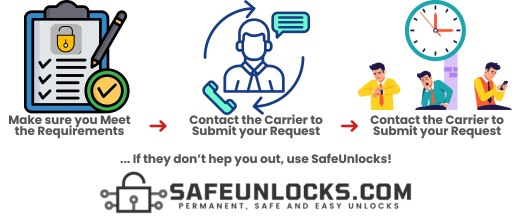
There are several ways to unlock your phone. The most common is through your carrier β€” once you've fulfilled your contract and paid off the phone, you can request an unlock. However, they may charge a fee and the process can take days. A faster, more affordable option is using a third-party service. Today, we recommend the best unlocking service on the internet: SafeUnlocks ⚑.

What is the Total Wireless Device Unlocking Policy?

πŸ“‹ To use a new SIM card from a different carrier, your phone must meet certain requirements that are not always easy to obtain β€” as this is not something beneficial for a carrier. Here's the checklist you need to be eligible for unlock by Total Wireless:

  • βœ…

    Good Standing with Account

  • πŸ“…

    60 Days Active Service

  • πŸ‘€

    Original Owner of Phone

  • πŸ’³

    Device Fully Paid Off

  • πŸ“œ

    Clean History with Company

If you meet all of these requirements, you need to call Total Wireless and request the unlocking of your phone πŸ“ž. You will likely receive an email if your phone is eligible for unlocking; if not, they will also notify you explaining the reasons why.

πŸ€” How Do I Know If My Device Will Be Unlocked or Not?

That's hard to tell because, from this point on, it will depend on whether you meet the unlocking policies established by your carrier, which in this case is Total by Verizon. If they consider that the device is eligible, the customer care agent will approve the request β€” but if not, they'll deny it ❌.

How Do I Know If My Device Will Be Unlocked or Not

πŸ’‘ Good news! You can start your unlock request only with your IMEI if you use a third-party tool. Using this alternative method will remove all the headaches that unlocking your phone with the carrier might cause β€” no waiting, no eligibility requirements, just results! ⚑

Unlocking Total Wireless Phones with SafeUnlocks: Advantages

πŸ† SafeUnlocks is the best option to unlock your phone, and we have strong reasons to tell you this. We provide all our customers with fast, safe, affordable, and high-quality services β€” guaranteed to unlock your Total Wireless phone. Here's why you should choose us:

🎯

99.9%

Unlock Success Rate

We can unlock Total Wireless phones no matter the brand. Plus, we unlock devices from most carriers worldwide.

⚑

5 min

Average Processing Time

We perform the unlocking within minutes, with an average unlocking time of just 5 minutes per phone.

πŸ’°

$1

Per Unlock + Lifetime Guarantee

The lowest price on the internet! No trial, no hidden fees β€” permanent unlock with lifetime guarantee.

πŸ›‘οΈ Does SafeUnlocks Program affect my Phone?

β–Ό

Not at all! What we mentioned about losing your phone warranty applies to other unlock methods that involve rooting/jailbreaking your phone or installing risky APK files. However, as SafeUnlocks' Total Wireless lock removal service doesn't require any of that, it is 100% safe to fix your phone with us βœ….

πŸ“‹ What Do I Need to Unlock with SafeUnlocks?

β–Ό

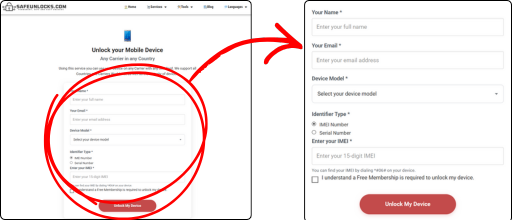
To unlock a Total Wireless phone using our lock-removal software, provide us with:

  • πŸ“±

    Phone Brand

  • πŸ”’

    IMEI Number

  • πŸ‘€

    Your Name

  • πŸ“§

    Your Email

Your IMEI number is crucial β€” it verifies the brand, model, and carrier.

πŸ“² Is This Device Unlocking Service Compatible with Both Android and iOS?

Absolutely! SafeUnlocks' unlocking service is fully compatible with both Android and iOS devices. Regardless of whether you have an Android smartphone or an iPhone, our service can automatically unlock your device without asking you to meet any eligibility requirements πŸŽ‰. All you have to do is place your request, activate it, and follow the steps on the screen!

πŸš€ Steps to Unlock Your Phone with SafeUnlocks

With us, you can unlock your phone in just minutes. The process is simple, fast, and doesn't require any technical knowledge. Just follow these easy steps:

  1. 1

    🌐 Visit Our Official Website

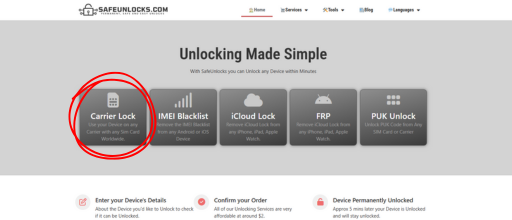
    First, head over to the SafeUnlocks website to start your unlock request. Click the button below to go directly to the carrier unlock page:

    Visit Our Official Website
  2. 2

    πŸ“ Enter Your Phone Details

    Once on our page, provide the details of the phone you want to unlock: device model, IMEI number, and an email address where we can contact you. With this information, we can open your unlocking request.

    Enter Your Phone Details
  3. 3

    🎁 Get Free Membership & Unlock

    To access all our services and perks, you'll need a free membership β€” just sign up with your email and follow the simple on-screen steps. That's it! Your phone will be unlocked in minutes.

    Get Free Membership and Unlock
πŸ’¬

Need More Help? We're Here 24/7!

If you need more information about carrier unlock or our services, visit our official webpage or contact our customer service, available 24/7/365. We'll get back to you as soon as possible. SafeUnlocks β€” permanent, easy, and fast unlocks! ⚑

❓ Unlocking a Total Wireless Phone with SafeUnlocks | FAQs

Knowing a little more about your unlocking alternatives before getting rid of the SIM lock on your phone and switching to a new carrier is important. That's why in this section, we will talk about the unlocking policies that you, as a Total Wireless Customer, need to meet if you want to unlock the phone with them!

We'll also answer some commonly asked questions about SIM unlocking mobile phones with SafeUnlocks for you to know a little more about our Total Wireless network unlock service and make the decision to fix your locked phone now!

πŸ€” Can I unlock my phone by myself?

β–Ό

Depends. If you want to unlock your device, you will need either a third party or the carrier directly to get your phone unlocked. This means that this process will always involve someone along the process. When it comes to the path you should take to get your network unlock code, it will always depend entirely on your situation and skills.

πŸ“± Does it matter if I still have an Active Service Plan with Total Wireless?

β–Ό

Having an active service plan with Total Wireless doesn't affect SafeUnlocks' network unlock service. The unlocking process is independent of your service plan or contract status, which allows you to unlock your device regardless of your current status with the carrier and whether you're on good terms with them or not. In addition, it doesn't really matter if you financed your device on a payment plan and haven't finished paying the installments, so go ahead and fix your device now!

πŸ’° How much does it cost to unlock your phone?

β–Ό

The cost of this process is not always the same and will always depend on the pathway you decide to use. Platforms like SafeUnlocks make it easy and affordable for anyone to remove the carrier lock from their device. Despite third-party platforms, the best way to unlock it is directly with your carrier if you have the chance to do so.

πŸ›‘οΈ Will my Phone's Warranty be voided if I unlock it from Total Wireless?

β–Ό

Even though with other platforms that's a possibility, unlocking your phone with SafeUnlocks won't void your phone's warranty! Our unlocking process is designed to be safe and non-invasive, ensuring that your device's warranty remains intact. You can confidently unlock your phone from Total Wireless using SafeUnlocks without any concerns about warranty issues or any damage to your device's performance whatsoever.